

In my previous article I described the Token Vending Machine pattern for AI agents on Amazon Bedrock AgentCore Gateway: an interceptor gives the retrieval tool short-lived credentials limited to one tenant, and IAM refuses every access outside that scope. The agent never decides whose data it reads. After that article, the next question was this one: the pattern works for a database table, but does it also work for a RAG?
The problem is the same, but a RAG (Retrieval-Augmented Generation) does not work like a database, even if there is a database under it. When you query a database, the request says which data it wants: in the architecture of the previous article, every request to DynamoDB names the partition key of the tenant, and the session policy allows only that key. IAM can check the request before it runs, because the requested data is written in the request itself.
In a RAG the request does not name a specific record of the database. The documents are stored as vectors, which are lists of numbers that represent the meaning of the text, and the question also becomes a vector. The database searches the vectors of an index, which is the set of vectors used for the search, for the ones closest to the vector of the question, and returns the matching documents. The search chooses the documents in the result after IAM has already authorized the request, so IAM can only check which index the request searches.
Importing Documents and Permissions into an Enterprise RAG
The use case is a company archive that an agent must be able to search, for example years of contracts, HR documents, project reports and meeting minutes in a document management system like SharePoint or Confluence. The search of these systems usually works with keywords, but the agent must find the passages with the meaning closest to the question, across years of documents. For this reason the documents need to be transformed into a specific format and imported into the RAG: each document is split into smaller parts, the chunks, each chunk becomes a vector, and the vectors are written to a vector store together with the information needed to find them again. Employees then ask the agent questions in natural language, and the agent searches the vector store for them.
A vector store is a database built to store vectors and to find quickly the ones closest to a given vector. It can be a dedicated service like S3 Vectors or a database with vector support, like PostgreSQL with pgvector.
In the company document management system, every document has its own permissions: an owner, the groups it is shared with, sometimes a list of colleagues, sometimes visibility for the whole company, and in some cases a user who is explicitly excluded, that is a deny. After the import, every employee must see through the agent the same documents they saw in the document management system. So the import must bring the permissions together with the content.
The agent acts on behalf of a person: it must read only what that person can read, and the model must not be able to choose a different person.
Permission Import Rules for a RAG
The permissions of a document must come from the metadata of the document management system, where in some cases they can be inherited from the site and the folder. The importer must compute the effective permissions of each document, because the vector store has no hierarchy to inherit them from.
Next, the identities must be translated. The document management system knows users and groups by its own identifiers, but at read time the identity comes from the login. The import must write the permissions with the identifiers that the login will use, that is the user identifier and the group name in the identity provider, otherwise no check can compare them. If a user is mapped to the wrong identity, every later check correctly applies a wrong permission, without any way to notice it.
The import writes the groups, not the list of their members: the membership of a user in a group comes from the login at read time. This way a change of membership does not require rewriting any data.
The importer is a system process that writes for all users, so it has permissions that no agent must have. It stays outside the path of the agent, and it runs as a dedicated job, completely separate from the application flow.
After the initial import, an incremental synchronization is necessary, because documents change, and permissions can change too. The time between a change in the document management system and its effect in the vector store is the time during which a revoked access still works. Synchronization also means removing: a deleted document or a revoked permission must disappear from the vector store.
Limits of Metadata Filters in a RAG
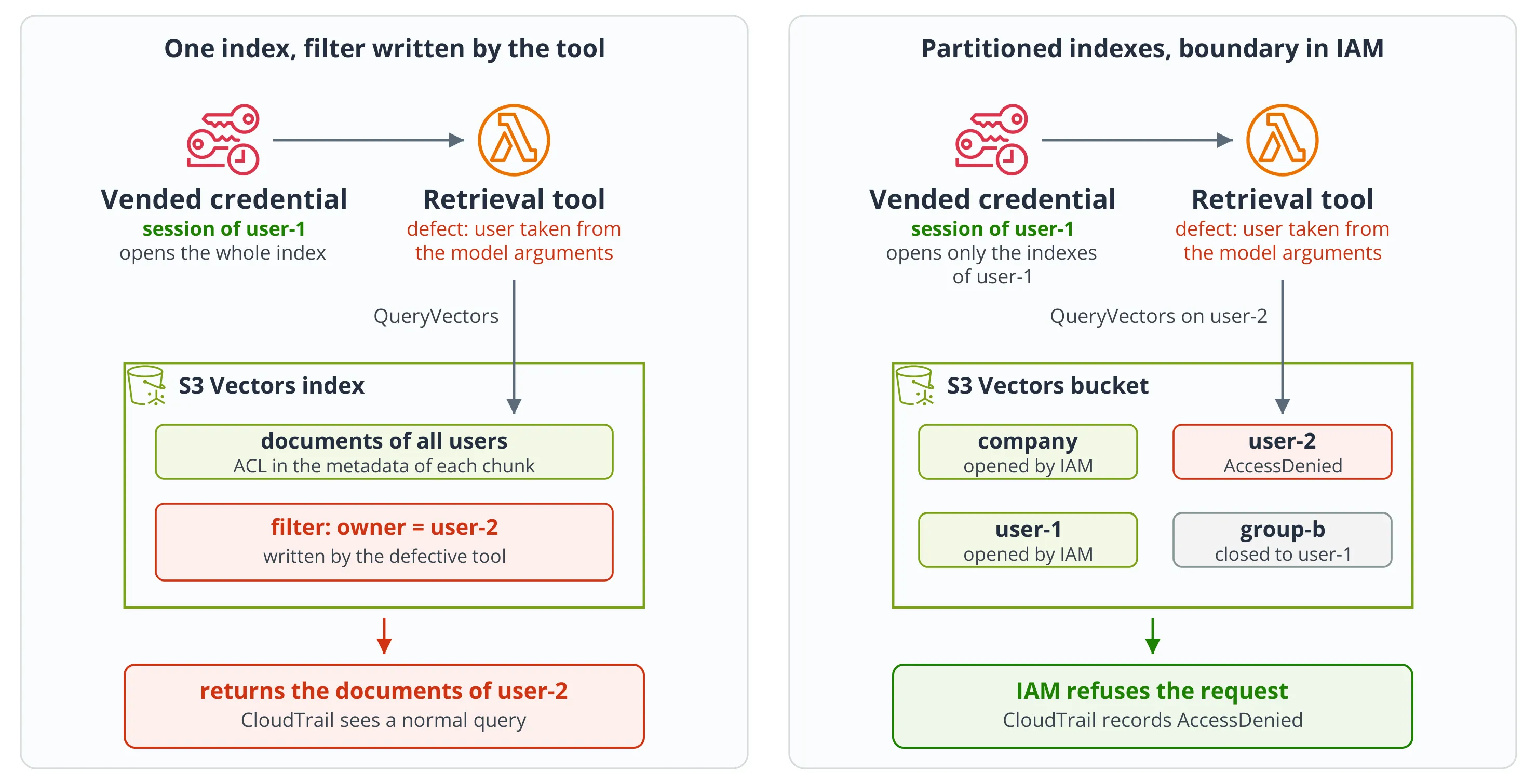
If the import writes all documents to a single vector index, with the permissions in the metadata of each chunk, the retrieval tool can read the whole index, whatever the user is. At query time the tool adds a metadata filter, for example “the owner is the current user, or one of the allowed groups is a group of the user”, and the vector store answers any filter it receives: the tool decides which documents to return.
But what happens if the code of the tool is wrong? Any bug is enough, for example a tool that takes the user identity from the arguments of the model instead of from the session, so that a prompt injection in a document can make it request the documents of another user, or a tool that keeps the identity of the previous request in memory. In cases like these the tool reads the documents of another user, and no other component notices it. A different credential for each user can help with traceability, because CloudTrail records the user the credential was created for. But it does not protect access: even a credential created for one specific user has permission to access the whole index, and in case of a bug the tool can use it to read the data of other users.
Isolation is reliable only if the vector store or IAM enforces the permissions, and if the user identity reaches them in a form that the tool cannot change. In the first case the permissions stay in the data and the vector store applies them itself, with a check at row or document level. The user reaches the vector store in a token signed by a component that the vector store trusts, for example the interceptor, and the vector store verifies the signature before it applies the permissions. In the second case IAM enforces them: the import writes the documents to different indexes depending on who can read them, and the credential that the interceptor gives to the tool for a request has permission to access only the indexes of the user of that request.
Access Control in Amazon S3 Vectors with Partitioned Indexes
Amazon S3 Vectors is an object storage with native vector support. The vectors are stored in a vector bucket, split into indexes, and a query returns the vectors closest to the vector of the question, with an optional metadata filter. There is no cluster to size and no database to manage: you pay for the storage you use and for the requests, with response times under one second. For small or irregular workloads it costs much less than a vector database that is always running, like OpenSearch or PostgreSQL with pgvector.
An S3 Vectors index is an AWS resource with its own name, its own ARN and its own tags, and it contains the vectors. When you create an index, you set the dimension of the vectors, that is how many numbers each vector has, and the way to measure the distance between two vectors, cosine or Euclidean, and after that you cannot change them. Each vector of the index has a unique key, the list of numbers and some metadata, that is key and value pairs like the document identifier or its text. You can use all metadata in query filters, except the metadata declared non-filterable when the index is created, which you can only read together with the result.
S3 Vectors has no access control of its own: no internal users or roles, no row-level security, and no way to verify a signed identity. Only IAM decides access, and for IAM the smallest resource is the index: the only condition keys that can tell users apart are the tags of the index and of the bucket, as the Service Authorization Reference for S3 Vectors shows.
For this reason the partitioning of the indexes follows the permission model. Each user has a personal index, with the documents the user owns and the documents shared directly with the user. Each group has an index with the documents shared with that group, and a company index contains the documents visible to everybody. A document is written to every index that matches its permissions: a document shared with two colleagues goes to the index of the owner and to the index of each colleague, and a document shared with two groups goes to the index of the owner and to the index of each group. So every share is a copy, and the number of vectors grows with the shares.
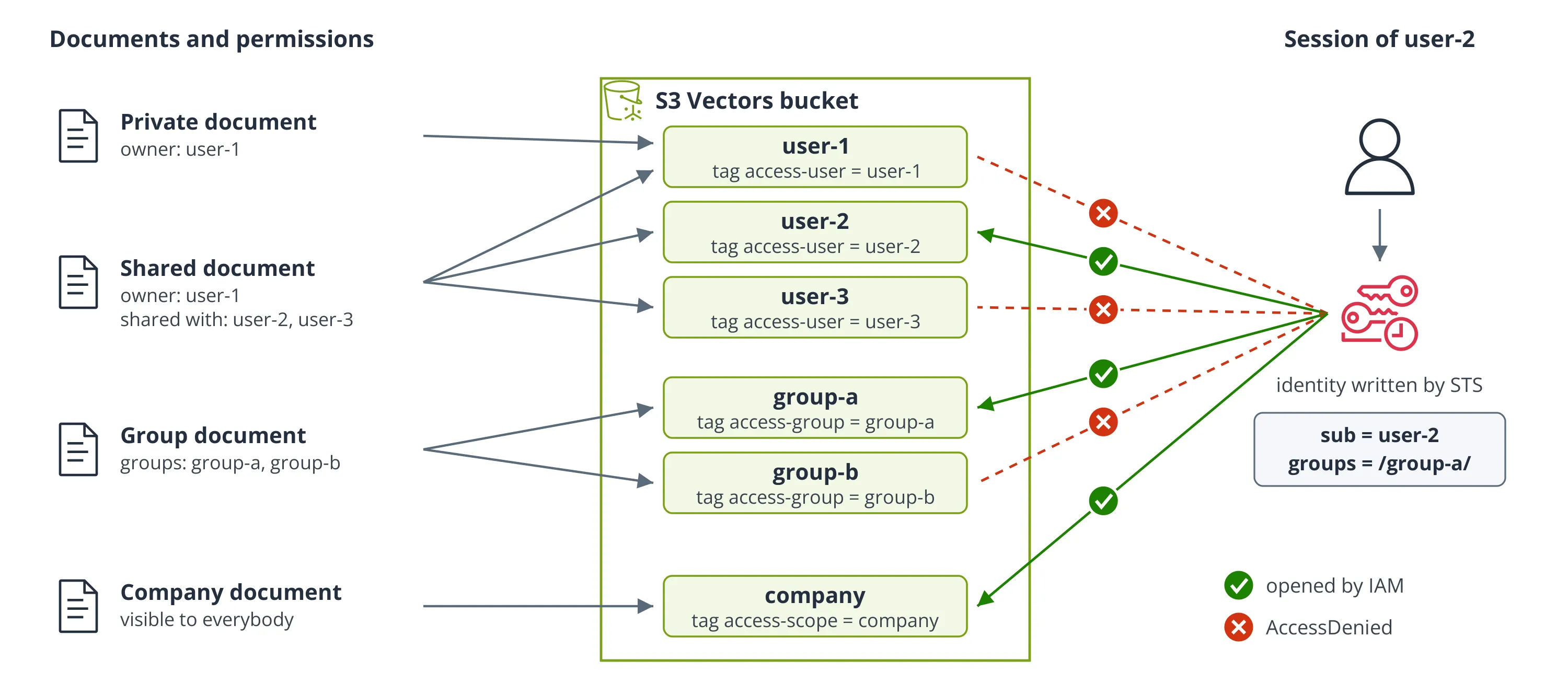
So owner, groups and visibility are not in the metadata of the vectors: they depend on the index that contains the vector. The filterable metadata keeps the identifier and the type of the document and the list of excluded users, which the deny needs; title and text are non-filterable metadata.
Each index has a tag that says who it belongs to: access-user with the user identifier, access-group with the group name, or access-scope for the company index. At read time IAM compares the tag with the identity of the user, and a tool that requests the index of another user or of another group receives AccessDenied, even if the code of the tool is wrong.
The group name also becomes part of the index name, which in S3 Vectors must start and end with a letter or a digit. If one component accepted a name that another component refuses, the group would have no index and its members would not see the documents of the group, with no error to explain why. For this reason all components that write or read a group name, from the importer to the function that creates the indexes, must apply the same rule: a group outside the rule produces an explicit error, and its members cannot use the agent until the group is renamed.
Importing and Syncing Partitioned Indexes in S3 Vectors
Each vector has a key that makes it possible to find all chunks of a document, for example the document identifier followed by the chunk number. When a document changes, the importer deletes all its chunks and then writes them again. Overwriting the same keys is not enough, because if the new document has fewer chunks, the extra ones would stay in the index. Between the deletion and the write the document is missing for a moment, but no search ever finds an old version.
In the synchronization, a new share with a colleague becomes a copy of the vectors in the index of the colleague, and the revocation deletes that copy, with immediate effect. For this reason the importer must know which indexes contain the copies of each document. The simplest registry is the indexes themselves: each vector has the document identifier in its key and in its metadata, so the list of the vectors of all indexes shows where each copy is, and it cannot differ from what actually exists.
The synchronization then compares the current permissions with this registry and applies only the differences. It copies the vectors to the new indexes without computing the embeddings again, deletes the copies where the document must no longer be, and writes again the documents that changed. But each synchronization reads all vectors, and for an archive with millions of vectors it is better to add a table that keeps the registry of the copies.
The lifecycle of the indexes must also follow the users and groups of the identity provider: a new user needs a personal index, and a new group needs a group index. This synchronization can be event-driven, but events are often delivered without guarantees, or it can be a periodic reconciliation between the identity provider and the indexes. The number of indexes grows with the users, but S3 Vectors allows at most 10,000 indexes per vector bucket: when users, groups and the company index are more than that, you need more buckets.
Trusted Identity Propagation for AI Agents with Amazon Cognito
The indexes and their tags define which data can be accessed. The next step is to understand how the question of a user reaches the indexes, and how the tool receives, for each question, a credential that is valid only for that user. The request path is the one in the diagram: the user authenticates, the application starts an agent session for the user, the agent sends each search request to the Gateway, and the interceptor of the Gateway gets the credential for the tool from STS. Along the whole path, the identity of the user must reach IAM without anyone being able to change it.
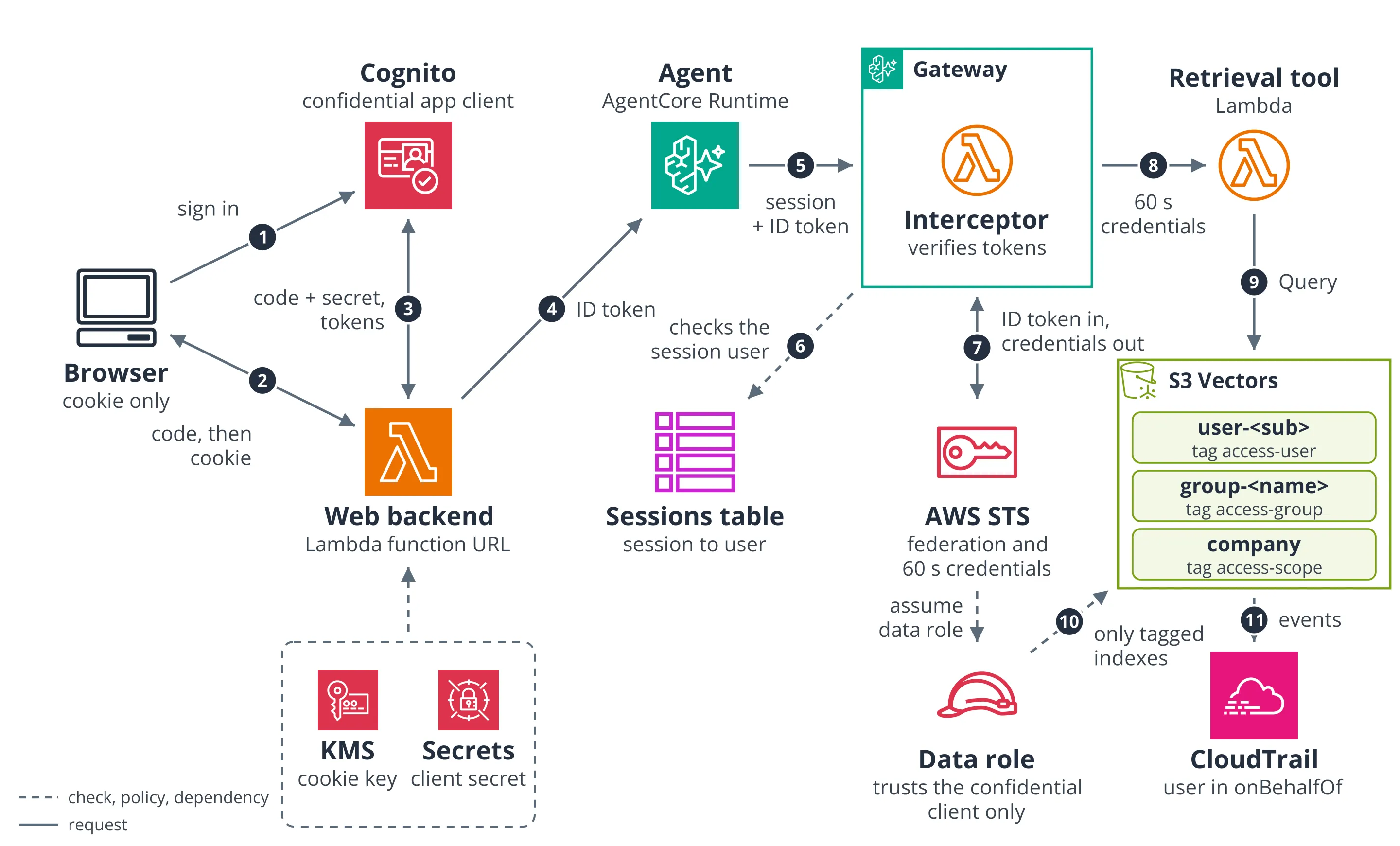
In the reference architecture the login uses Amazon Cognito, which in a company is usually federated with the company identity provider, and which identifies each user with their sub. After the login, a session starter starts the agent session on AgentCore Runtime and records in a table which user the session belongs to (it is the component that links each agent session to a person, and I described it in my article on identity and attribution of AI agents). The agent receives the ID token of the user from the application. Each request of the agent reaches the retrieval tool through AgentCore Gateway, together with the ID token, and a request interceptor of the Gateway verifies the ID token and checks that its sub is the user recorded for that session, so an agent cannot present the ID token of another user. Only after this check the interceptor gives the tool the credentials for the request, and for each request it writes an audit record with the session, the user and the arguments that the tool received.
In the classic version of the TVM, the interceptor assumes the data role, which is the role that can read the indexes, with its own credentials, and writes user and groups as session tags. This works, but the interceptor can write any identity, so a compromised interceptor can get credentials for any user. In exchange, the interceptor is the only component that can get credentials for the data: the data role trusts only the interceptor role, and only the Gateway can invoke the interceptor.
On November 19, 2026, AWS extended trusted identity propagation to IAM federation. It is a mechanism that puts the identity of the person inside the IAM credentials, so the service that receives the request knows both the role and the person behind it. AWS explains it well, with examples, in this post on its security blog. Before, the mechanism required IAM Identity Center; now an OIDC or SAML identity provider registered in IAM is enough.
The propagation starts from a token of the identity provider: with an OIDC provider like Cognito, the interceptor uses AssumeRoleWithWebIdentity instead of AssumeRole, which receives the ID token of the user and leaves to STS the task of reading its identity. With the Cognito user pool registered as an OIDC provider with propagation enabled, STS returns a session in which it has written the sub and the groups. The groups come from a claim that a Cognito pre token generation trigger adds to the ID token.
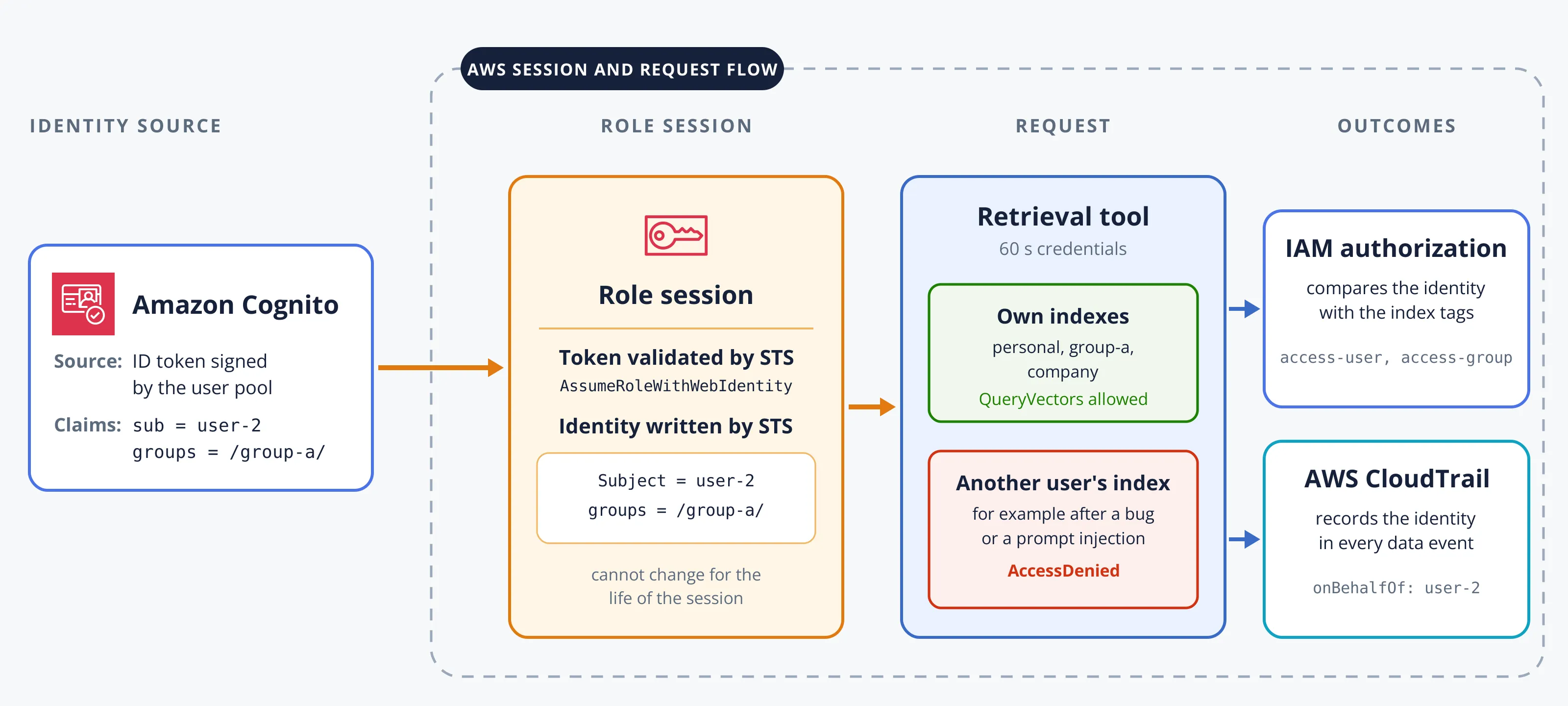
This way the interceptor can no longer choose the identity of the user. The two approaches compared:
| Session tags | Identity propagation | |
|---|---|---|
| User identity written by | the interceptor | STS, from the ID token signed by Cognito |
| A compromised interceptor can | get credentials for any user | act only for the users whose token it receives |
Short-Lived STS Credentials and IAM Policies for S3 Vectors
Together with identity propagation, AWS added GetScopedCredentials to STS (announcement). The API creates, from the temporary credentials in use, new credentials with a shorter life and fewer permissions, without assuming a role again and without losing the propagated identity. The AssumeRoleWithWebIdentity session lasts at least 15 minutes, so the interceptor reduces it to 60 seconds before it passes it to the tool, at a cost of about 50 ms per request. The credentials that the tool receives allow only reading the indexes, and they do not allow using GetScopedCredentials again: this way the tool cannot create new credentials, for example with a different duration.
GetScopedCredentials also accepts a description that appears in the CloudTrail event. The interceptor writes there the number of the request within the session, which together with the session ID in the session name identifies one request. This way a CloudTrail event and the audit record of the interceptor match one request at a time, instead of only by session and time.
The policies of the data role use three context keys of identity propagation, one for each type of index:
| Context key | Content | Index |
|---|---|---|
aws:OriginIdentity/Subject | the sub of the user | personal, with the access-user tag |
aws:TransactionContext/IdentityProvider/groups | the string of groups, for example /group-a/group-b/ | group, with the access-group tag |
aws:OriginIdentity/Issuer | the identity provider that created the token | company, with the access-scope tag |
The policy for the personal index uses the subject:
"Condition": {
  "StringEquals": {
    "aws:ResourceTag/access-user": "${aws:OriginIdentity/Subject}"
  }
}
In the policy, ${aws:OriginIdentity/Subject} is a variable: at request time IAM replaces it with the sub of the user of the session, so a single statement works for all personal indexes.
For the group condition there is a constraint: identity propagation accepts only one value of at most 128 characters for each claim. But a user can belong to several groups, and to fit all of them in one value you must join them in a single string, for example /group-a/group-b/. The policy then searches for the group name of the index inside that string, with StringLike. This is the statement for the group indexes:
{
  "Effect": "Allow",
  "Action": ["s3vectors:QueryVectors", "s3vectors:GetVectors"],
  "Resource": "arn:aws:s3vectors:*:*:bucket/rag-tvm-vectors-partitioned/index/*",
  "Condition": {
    "StringLike": {
      "aws:TransactionContext/IdentityProvider/groups": "*/${aws:ResourceTag/access-group}/*"
    }
  }
}
The slashes on both sides of each name prevent a partial match: a group named sales does not give access to an index with the tag sales-archive. The StringLike pattern is built from the tag of the index, so the tag must never contain wildcard characters: only the function that creates the indexes writes it, and it accepts only lowercase letters, digits and hyphens.
The two policies use operators without IfExists, that is StringEquals and StringLike. With StringEqualsIfExists or StringLikeIfExists the condition would be true also when the key of the propagated identity is missing, and a session without an identity would get access.
The tool queries all indexes of the user in parallel: the personal one, the company one and one for each group. It asks each index for more results than it needs, merges them sorted by distance, and keeps only one chunk for each document, because the same document can be in more than one index. In each query it also adds the filter on the list of excluded users. Querying more indexes takes time: for a user with two groups, the median request through the Gateway goes from about 340 ms with one index to about 500 ms.
Backend for Frontend and ID Token Protection
Identity propagation changes whom the data role trusts. With session tags the data role trusts only the interceptor role: no other component can get credentials, so every request must reach the interceptor. With propagation, instead, the data role trusts the identity provider, and it accepts anyone with a valid ID token, because AssumeRoleWithWebIdentity does not ask for AWS credentials: the only proof is the ID token.
In a normal web application the ID token is in the browser. So the user could use it to request credentials from STS directly and query the indexes without the agent, the Gateway and the tool. This way the user would skip the filter on excluded users, which only the tool applies, and would leave no record in the interceptor. For this reason the ID token must never reach the browser.
The solution is a backend for frontend, that is a server-side backend that acts as the OAuth client instead of the browser: it gets and stores the tokens, and the browser talks only to it. It is a pattern that has been common for years, and this article by Auth0 explains it well. The application uses a confidential Cognito app client, with a client secret and the authorization code flow with PKCE. The browser receives only a one-time code and passes it to the backend, which exchanges the code for the tokens with the client secret. The browser never sees the ID token: it keeps a cookie with the refresh token encrypted with a KMS key that only the backend can use. The trust policy of the data role accepts only tokens with the audience of the confidential client.
The one-time code that the browser receives is useless without the client secret, and the cookie contains only encrypted data that the browser cannot use. STS refuses an ID token created for another app client, even in the same user pool, because of the audience. After a logout the backend can no longer renew the tokens, and the session stops when the last ID token expires.
With the backend for frontend, each component of the path knows only the data it needs:
| Component | Known data |
|---|---|
| Browser | a cookie with the encrypted refresh token, which it cannot use |
| Web backend | the client secret, and the ID token only while it handles a request |
| Agent | the most recent ID token, in memory |
| Interceptor | the ID token of each request, to verify it and to request the credentials from STS |
| Tool | 60-second credentials, valid only for the indexes of the user |
With this change, both properties are true at the same time: the interceptor cannot choose the identity of the user, and the user cannot reach the data without the agent, because the user never has a token that STS accepts for the data role.
Because group membership comes from the token, leaving a group takes effect from the next renewal of the ID token: the web backend renews it when the application asks for the state of the session and passes it to the agent, so the delay depends on how often the application does this, and at most it reaches the expiry of the ID token.
Limits of Partitioned Indexes in S3 Vectors
The deny rule stays in the tool. IAM gives access to whole indexes, so “a group except one person” cannot be written at index level, and a tool that forgets the filter on excluded users returns the document also to the excluded user. The rule can move into IAM by copying the documents with a deny to the personal index of each allowed member instead of the group index, at the price of more copies and more work at every change of membership.
Anyone with a valid ID token of the confidential client can request credentials from STS that last up to the maximum session duration of the role, and IAM does not allow setting it below one hour. Those credentials skip the filter on excluded users and leave no record in the interceptor. The ID token exists in the web backend and is sent as a header to AgentCore Runtime, the agent, the Gateway and the interceptor, without being written to the logs. To get it, an attacker must run code inside one of these components, have the permissions to change their code, or have the client secret.
The string of groups can be at most 128 characters long. A user with many groups does not fit, and the trigger must decide what to do: removing the claim leaves the user without groups, and the user has no access to the group documents.
The client secret can be read with cognito-idp:DescribeUserPoolClient, and anyone who has it together with a login code gets the tokens of that user without using the components. Anyone with that permission on the user pool must be treated as an administrator of the RAG.
The design works only for interactive applications. The backend renews the ID token with the refresh token, so a session lasts at most as long as the refresh token, 60 minutes in this design, and then a new login is necessary. A background job without a user would stop when the ID token expires.
Comparison of RAG Backends on AWS
RAG backends on AWS write the permissions in different places during the import, and that place decides which component enforces them instead of the tool. For each backend, what matters is which component writes the user identity:
| Backend | Where the import writes the permissions | User identity written by | If the tool is wrong, it reads the documents of another user |
|---|---|---|---|
| Bedrock Managed Knowledge Base | ACL files next to each document | the tool, in the user context | yes |
| S3 Vectors with one index | metadata of each chunk | the tool, in the metadata filter | yes |
| pgvector on Aurora | columns in the tables | the interceptor, in a signed single-use token | no |
| OpenSearch Service | fields of each document | the interceptor, in a signed JWT | no, unless the token is reused before it expires |
| S3 Vectors with partitioned indexes | structure of the indexes | STS, from the user token | no, except documents with a deny |
Bedrock Managed Knowledge Base imports the permissions from ACL files next to each document. With an S3 data source, ACL entries accept only users, identified by email, so the import must expand each group into the list of its members, and a document without an ACL is not imported. Every change of permission, even a user leaving a group, requires rewriting the ACL files and a synchronization job. At read time the service filters by the user that the tool passes to it, and AWS states this in the documentation: the feature provides “ACL-aware filtering, not a security boundary”.
pgvector on Aurora receives the permissions as columns in its tables, and Row Level Security compares them with the identity of the session. The tool connects to the database with the same role for all users. User and groups arrive in a token signed by the interceptor, valid for a single use, and a policy function verifies the signature, the expiry and the single use before the RLS policies apply. A tool with a bug receives zero rows, because it cannot sign a token and cannot reuse one. Here the vector store trusts whoever has the signing key, that is the interceptor.
OpenSearch Service receives the permissions as fields of each document, and document-level security compares them with the user and the groups of a JWT signed by the interceptor with a KMS key. The domain never has the private key. The request cannot be signed with IAM, because the IAM signature and the JWT both use the Authorization header: so the access policy of the domain must accept any client. The token is valid for every request until it expires, 60 seconds in this design: a tool that reuses it can return the data of that user to another user until then. Document-level security queries of different roles on the same index are combined with OR, so a second role on the index removes the deny of the first one.
| Backend | Permissions enforced by | Revocation of a permission on a document | Median latency through the Gateway | Estimated monthly cost |
|---|---|---|---|---|
| Managed Knowledge Base | the service, with the user passed by the tool | about 2 minutes, with synchronization | about 550 ms | about 30 USD |
| pgvector on Aurora | the vector store, with a signed token | about 1 second | about 400 ms | about 70 USD |
| OpenSearch Service | the vector store, with a signed JWT | less than 1 second | about 300 ms | about 42 USD |
| S3 Vectors, one index | the tool | less than 1 second | about 340 ms | about 0.26 USD |
| S3 Vectors, partitioned | IAM, except the deny | immediate, by deleting the copy | about 500 ms | about 1.90 USD with the web backend |
The costs are estimates with 1,000 questions per day and list prices in Frankfurt. pgvector and OpenSearch have a fixed cost even when nobody asks anything: for pgvector, with the cluster paused, the endpoints, the secrets and the storage remain. S3 Vectors charges per request, and with partitioned indexes each question becomes more than one request, one for each index; at this scale the difference is a few cents, but the main cost items are the KMS key and the secret of the web backend.
Auditing AI Agent Retrieval with AWS CloudTrail
An audit must answer one question: which user read which data through which session. The backends give very different answers.
| Backend | CloudTrail records |
|---|---|
| Managed Knowledge Base | the role of the tool, never the user context |
| S3 Vectors, one index | the role of the tool, and about the query only whether it had a filter |
| pgvector on Aurora | no query, at most the connection of the tool |
| OpenSearch Service | nothing about the search; the audit log of the domain has the user of the JWT |
| S3 Vectors, partitioned | user and groups in every QueryVectors event, written by STS |
In the first three cases, if the interceptor creates a credential for each user, CloudTrail shows which user the credential was created for, and this helps with traceability. But CloudTrail does not see for which user the tool requested the data: the user is in the arguments of the request, in the filter or in the user context, and a tool with a bug can request the data of another user with the right credential.
For this reason the audit record of the interceptor, which contains the arguments of each request of the tool, is the only place where you can compare the user of the session with the user for whom the tool requested the data. That record must exist from the first day, because nothing else can rebuild it.
With partitioned indexes, instead, even a refused attempt leaves a complete trace. This is a refused QueryVectors event, reduced to the useful fields: onBehalfOf contains the user of the session, written by STS, the last part of the role ARN is the session ID, and indexName is the personal index of another user.
{
  "eventTime": "2026-11-21T11:53:52Z",
  "eventName": "QueryVectors",
  "errorCode": "AccessDenied",
  "errorMessage": "AccessDeniedException: User: arn:aws:sts::111122223333:assumed-role/rag-tvm-retrieval-s3-vectors-partitioned-indexes/dbcd39ec-ae21-4c48-a067-bf3d135f4f0c is not authorized to perform: s3vectors:QueryVectors on resource: arn:aws:s3vectors:eu-central-1:111122223333:bucket/rag-tvm-vectors-partitioned/index/user-93944822-10a1-7021-e50c-96bfe279fd75 because no identity-based policy allows the s3vectors:QueryVectors action",
  "userIdentity": {
    "arn": "arn:aws:sts::111122223333:assumed-role/rag-tvm-retrieval-s3-vectors-partitioned-indexes/dbcd39ec-ae21-4c48-a067-bf3d135f4f0c",
    "onBehalfOf": {
      "subject": "53d468e2-a0d1-7057-7bce-c86daf5838a2",
      "federatedProviderArn": "arn:aws:iam::111122223333:oidc-provider/cognito-idp.eu-central-1.amazonaws.com/eu-central-1_1pRwiX7g0",
      "issuer": "cognito-idp.eu-central-1.amazonaws.com/eu-central-1_1pRwiX7g0",
      "subjectType": "user"
    }
  },
  "requestParameters": {
    "vectorBucketName": "rag-tvm-vectors-partitioned",
    "indexName": "user-93944822-10a1-7021-e50c-96bfe279fd75"
  }
}
In all these designs, two logs can contain data that they should not contain. Bedrock model invocation logging contains the retrieved documents of all users in a single log group. And the Lambda data events in CloudTrail contain the client context of each invocation, where the Gateway puts the propagated headers: a trail that records the invocations of the tools also records the credentials given to the tools.
Key Takeaways
- Importer mistakes become wrong permissions. Effective permissions and identity translation are part of access control as much as the IAM policy.
- A metadata filter protects only if the code of the tool is correct. The vector store answers any filter it receives: isolation is reliable only if the vector store or IAM enforces the permissions, with an identity that the tool cannot change.
- In S3 Vectors IAM decides per index, so permissions must become indexes. Owner, groups and company become separate indexes, each one with its own tag.
- If only one component can get the credentials, every request must reach that component. When the credentials are obtained by presenting a token, the token is what must be protected.
- A token that can get credentials for the data must never reach the browser. A server-side backend must keep it.
- Design the audit record before the first query. If IAM does not enforce the permissions, CloudTrail does not know for which user the tool requested the data, and only the audit record of the interceptor can tell.
Comments ·
Loading comments…
Sign in to leave a comment.