

At re:Invent 2025, AWS announced Lambda Durable Functions. The feature introduces a checkpoint/replay mechanism that allows Lambda executions to run for up to one year, automatically recovering from interruptions by replaying from the last checkpoint.
Lambda’s 15-minute timeout is not a bug or a limitation to work around. It is a deliberate design choice that encourages keeping functions simple and focused, and in most cases it does its job well. When a function needs more time, the usual approach is fanout: split the work into smaller Lambdas, orchestrate them, move on. I have done it many times and it works perfectly fine.
But a few days ago I was developing a new Lambda function for a pipeline orchestrated by Step Functions, and the execution time exceeded 15 minutes. I could have done the usual split, but durable functions had just come out and I wanted to try them.
At first glance, durable functions can look like a replacement for Step Functions. Both services manage multi-step workflows, both offer checkpointing and automatic recovery, and both let you coordinate complex operations. For certain use cases, that might actually be the case: if your entire workflow lives inside a single Lambda, durable functions can handle everything on their own without an external orchestrator.
But the AWS documentation actually suggests using them together. The “Hybrid architectures” section says it explicitly: many applications benefit from combining the two services, using durable functions for application-level logic within Lambda and Step Functions to coordinate the high-level workflow across multiple AWS services. My case fit that description, and more than a perfect architectural match, I wanted to learn how the two services actually work together and form my own opinion on when the hybrid approach makes sense.
I figured integrating the two would be a small change. It was my first time working with the durable execution SDK, and since the code I write is mostly infrastructure and automation rather than application development, the learning curve turned out to be steeper than I expected.
This article walks through the real journey, from the initial attempt, through the errors I hit, to the patterns that actually work in production.
CDK Infrastructure
A durable function needs three things on top of a regular Lambda: a durable_config with execution_timeout and retention_period on the L2 Function constructor, a Lambda Version and Alias (durable functions require qualified ARNs), and the AWSLambdaBasicDurableExecutionRolePolicy managed policy on the execution role.
Since CDK’s L2 Function construct natively supports durable_config, you declare it directly in the constructor.
One thing to be aware of: you cannot add
durable_configto an existing Lambda function. Adding it triggers a resource replacement, meaning CDK will delete the old Lambda and create a new one. In my case this was fine because I was reusing the same application code, so the new function behaved identically. But if you have event source mappings, reserved concurrency, or other configuration tied to the function ARN, plan for the replacement accordingly.
I then created a helper to handle the remaining boilerplate (IAM policy, Step Functions callback permissions, version, alias):
from aws_cdk import aws_lambda as _lambda, aws_iam as iam, Duration

# The function itself declares durable_config in the constructor
fn = _lambda.Function(
    scope, "MyFunction",
    runtime=_lambda.Runtime.PYTHON_3_14,
    handler="handler.handler",
    code=_lambda.Code.from_asset(lambda_path),
    timeout=Duration.minutes(15),
    durable_config=_lambda.DurableConfig(
        execution_timeout=Duration.hours(1),
        retention_period=Duration.days(3),
    ),
)

def _make_durable(
    fn: _lambda.Function,
    alias_name: str = "live",
) -> _lambda.Alias:
    fn.role.add_managed_policy(
        iam.ManagedPolicy.from_aws_managed_policy_name(
            "service-role/AWSLambdaBasicDurableExecutionRolePolicy"
        )
    )

    fn.add_to_role_policy(iam.PolicyStatement(
        actions=["states:SendTaskSuccess", "states:SendTaskFailure"],
        resources=["*"],
    ))

    version = fn.current_version
    alias = _lambda.Alias(fn, f"DurableAlias-{alias_name}",
                          alias_name=alias_name, version=version)
    return alias
The helper returns an Alias (which implements IFunction), so it plugs directly into tasks.LambdaInvoke without any workflow changes. A nice property of this approach is that you can have durable and standard Lambdas coexisting in the same Step Functions workflow. I only needed to make the new function durable; the other tasks kept running as regular Lambdas.
Refactoring the Handler
The @durable_execution decorator replaces the standard Lambda handler signature. Each unit of work becomes a context.step() call that gets independently checkpointed.
There are a few key rules from the best practices documentation to keep in mind: code outside steps must be deterministic (no API calls, no datetime.now(), no UUIDs), boto3 sessions are not serializable so you need to recreate them inside each step, and step return values must be serializable and under 256 KB (the checkpoint limit).
Here is the pattern I used for the function:
from aws_durable_execution_sdk_python import DurableContext, durable_execution

@durable_execution
def handler(event: dict, context: DurableContext) -> dict:
    # Deterministic setup, no I/O here
    job_id = event["job_id"]
    target_id = event.get("target_id")

    # Step 1: Get the list of endpoints to call
    def _get_endpoints(_):
        client = create_api_client(target_id)  # fresh client per step
        return client.list_endpoints()

    endpoints = context.step(_get_endpoints, name="get_endpoints")

    # Step 2: Process global data
    def _process_global(_):
        client = create_api_client(target_id)
        return client.get_global_data()

    global_data = context.step(_process_global, name="global_data")

    # Step N: Per-endpoint processing
    per_endpoint_results = {}
    for endpoint in endpoints:
        def _process_endpoint(_, ep=endpoint):
            client = create_api_client(target_id)
            return client.get_data(ep)

        per_endpoint_results[endpoint] = context.step(
            _process_endpoint, name=f"endpoint_{endpoint}"
        )

    # Final step: store results
    def _store(_):
        store_results(job_id, target_id, per_endpoint_results)
        return {"processed": len(per_endpoint_results), "status": "complete"}

    result = context.step(_store, name="store_results")

    return {"statusCode": 200, "result": result}
Each step is independently checkpointed. If the Lambda times out after completing global_data, the next invocation replays get_endpoints and global_data from checkpoint (without re-executing them), then continues with the next step.
The Synchronous Invocation Trap
With the durable Lambda deployed and the CDK alias wired into the workflow, I ran the pipeline. It failed immediately:
Lambda.InvalidParameterValueException: You cannot synchronously invoke
a durable function with an executionTimeout greater than 15 minutes.
In hindsight this makes perfect sense. Step Functions’ default LambdaInvoke uses synchronous invocation: it calls the Lambda and waits for the response. But durable functions with execution timeouts beyond 15 minutes can only be invoked asynchronously. Synchronous invocations are capped at 15 minutes regardless of the durable config.
To solve this, I switched to the Wait for Callback with Task Token integration pattern with asynchronous invocation.
tasks.LambdaInvoke(
    scope, "MyDurableTask",
    lambda_function=lambdas["my_function"],
    integration_pattern=sfn.IntegrationPattern.WAIT_FOR_TASK_TOKEN,
    invocation_type=tasks.LambdaInvocationType.EVENT,
    payload=sfn.TaskInput.from_object({
        "TaskToken": sfn.JsonPath.task_token,
        "job_id.$": "$.job_id",
        "target_id.$": "$.target_id",
    }),
    result_path=sfn.JsonPath.DISCARD,
    heartbeat_timeout=sfn.Timeout.duration(Duration.hours(1)),
)
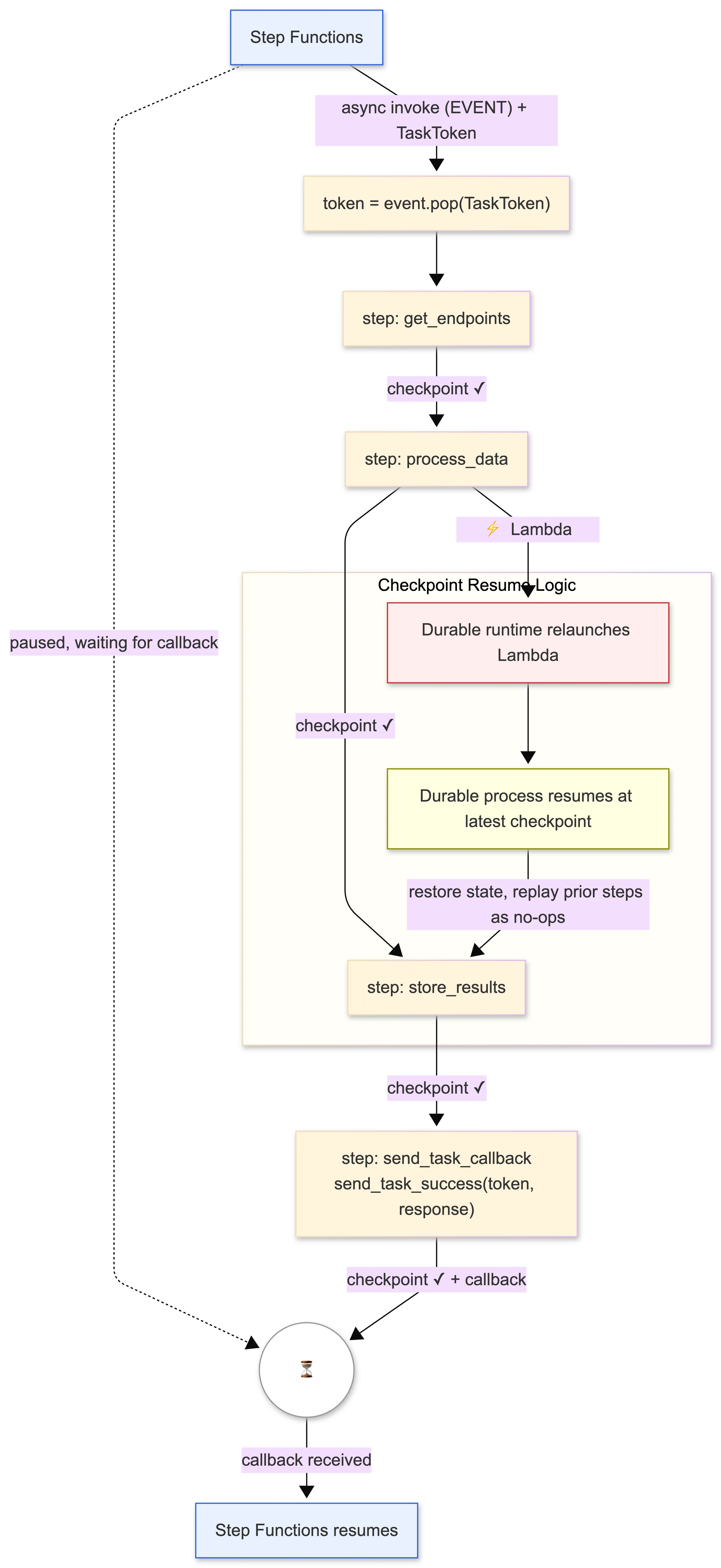
With WAIT_FOR_TASK_TOKEN, Step Functions fires the Lambda asynchronously (fire-and-forget) and pauses the workflow. The Lambda receives a TaskToken in its event payload. When the Lambda finishes, it must call SendTaskSuccess (or SendTaskFailure) with that token to signal completion.
The heartbeat_timeout defines how long Step Functions will wait before considering the task failed. I set it to match the durable execution timeout.
The Callback Pattern, or Where to Put SendTaskSuccess
With WAIT_FOR_TASK_TOKEN, the Lambda needs to call SendTaskSuccess when it finishes to resume the workflow. The instinct is to put it at the end of the handler as regular code, after all the durable steps:
@durable_execution
def handler(event: dict, context: DurableContext) -> dict:
    task_token = event.pop("TaskToken", None)

    # ... all your durable steps ...

    # Seems natural, but problematic
    if task_token:
        boto3.client("stepfunctions").send_task_success(
            taskToken=task_token, output=json.dumps(response, default=str)
        )
    return response
The problem is that code outside context.step() calls runs on every replay. So this send_task_success would fire again every time the Lambda replays, sending duplicate callbacks. And if the Lambda gets interrupted right before that line, it never fires at all and Step Functions hangs forever.
The SendTaskSuccess call must be a durable step:
@durable_execution
def handler(event: dict, context: DurableContext) -> dict:
    # Extract token BEFORE durable steps (deterministic, no I/O)
    task_token = event.pop("TaskToken", None)

    # ... all your durable steps ...

    response = {"statusCode": 200, "result": result}

    # Send callback as the FINAL durable step
    if task_token:
        def _send_callback(_):
            sfn_client = boto3.client("stepfunctions")
            sfn_client.send_task_success(
                taskToken=task_token,
                output=json.dumps(response, default=str),
            )
        context.step(_send_callback, name="send_task_callback")

    return response
Wrapped in a context.step(), the callback is checkpointed: it runs once, and on replay the SDK skips it. event.pop("TaskToken") is deterministic (same result on replay), so it is safe outside steps.
The 256 KB Checkpoint Limit
The best practices I mentioned earlier list the 256 KB checkpoint limit, but I glossed over it at first. I did not expect any of my steps to return that much data. I was wrong: as soon as I ran the pipeline on a larger input, one of my steps hit the wall:
InvalidParameterValueException: STEP output payload size must be
less than or equal to 262144 bytes.
The step in question returned a JSON that, for certain inputs, exceeded the limit.
I merged the large step into store_results. Since that step already stores everything to DynamoDB, the data never needs to cross a checkpoint boundary:
# Before: large step as a separate step (can exceed 256KB)
data = context.step(_process_data, name="process_data")
# ... later ...
result = context.step(_store, name="store_results")

# After: moved inside store_results
def _store(_):
    # Process inline, no checkpoint needed for this data
    data = do_work(job_id, target_id, endpoints)

    # ... aggregate, store to DynamoDB ...
    store_results(job_id, target_id, payload)

    # Return only a small summary (well under 256KB)
    return {"processed": len(data), "status": "complete"}
Once I had this working, I realized it came with a tradeoff. When the large step was on its own, it had its own checkpoint: if the Lambda restarted after completing it, the replay would skip it and jump straight to store_results. By merging the two, that checkpoint is gone. If the Lambda restarts during store_results, it replays the entire merged step from scratch. Repeating work that was already done is not ideal, especially when that work is slow or expensive.
The merge works because the window of risk is small: the processing takes a few seconds, the DynamoDB store is fast, and an interruption between the two is unlikely. But this tradeoff kept bothering me, so I went back to the SDK documentation to see if there was a better option.
There is. The SDK provides run_in_child_context, which groups multiple steps into a single unit while preserving their individual checkpoints. The key behavior is described in the docs: if the child context’s result exceeds 256 KB, the SDK re-executes the context code on replay, but the steps inside it are resolved from the checkpoint log without re-executing. So the expensive work stays checkpointed individually, and only the lightweight assembly logic (pure in-memory, no I/O) re-runs on replay.
In practice, this means that if the Lambda restarts after the heavy step but before the store completes, the replay skips it and jumps straight to the assembly. With the merge approach, it would have repeated everything. The difference can seem marginal, but for functions dealing with slow or expensive operations, it would matter.
def _process_and_store(child_ctx: DurableContext) -> Dict:
    # Inner step 1: the heavy work (checkpointed individually)
    def _process_data(_):
        return do_work(job_id, target_id, endpoints)

    data = child_ctx.step(_process_data, name="process_data")

    # Deterministic assembly (no I/O, re-runs on replay)
    aggregated = aggregate_results(per_endpoint_results, global_data, data)
    payload = build_payload(job_id, target_id, aggregated)

    # Inner step 2: store to DynamoDB (checkpointed individually)
    def _store_results(_):
        store_results(job_id, target_id, payload)
        return {"processed": len(data), "status": "complete"}

    return child_ctx.step(_store_results, name="store_results")

result = context.run_in_child_context(
    _process_and_store,
    name="process_and_store",
)
At this point I assumed the child context handled the size problem entirely, so I did not worry about what the inner steps returned. When I tested again with a large workload, I found out that was wrong:
RequestEntityTooLargeException: Request must be smaller than
6291456 bytes for the InvokeFunction operation
The error came from CheckpointDurableExecution, the SDK’s internal call to persist checkpoint data. The stack trace pointed to the process_data inner step.
Here is what I missed: run_in_child_context prevents the child context’s overall result from being checkpointed when it exceeds 256 KB. But the inner steps inside the child context are still individually checkpointed. The process_data step returned a large JSON, and the SDK tried to checkpoint that result. CheckpointDurableExecution is a Lambda API call under the hood, so it is subject to Lambda’s standard invocation payload limit of 6 MB. When the serialized checkpoint exceeded that, the call failed.
So there are two separate limits at play: 256 KB for a single step’s checkpointed result, and 6 MB for the entire CheckpointDurableExecution API call payload. The child context handled the first limit. But the inner step’s return value was still being serialized into the checkpoint API call, and for large enough datasets it blew past the second.
The fix follows the best practices more literally: “Store IDs and references, not full objects. Use Amazon S3 or DynamoDB for large data, pass references in state.” Instead of returning the full dataset from the step, I store it directly in DynamoDB inside the step and return only a lightweight summary:
def _process_and_store(child_ctx: DurableContext) -> Dict:
    # Inner step 1: do the work, store to DynamoDB, return summary
    def _process_data(_):
        data = do_work(job_id, target_id, endpoints)

        # Store data directly, don't return it
        persist_data(job_id, target_id, data)

        # Return only what downstream code needs
        return {
            "total": len(data),
            "by_category": count_by_category(data),
            "flagged": [
                {"id": d["id"], "type": d["type"]}
                for d in data
                if d.get("flagged")
            ],
        }

    summary = child_ctx.step(_process_data, name="process_data")

    # Deterministic assembly uses the lightweight summary
    aggregated = aggregate_results(per_endpoint_results, global_data)
    flagged_alerts = build_alerts(summary["flagged"])
    payload = build_payload(job_id, target_id, aggregated, flagged_alerts, summary)

    # Inner step 2: store aggregated results (data already persisted)
    def _store_results(_):
        store_results(job_id, target_id, payload)
        return {
            "processed": summary["total"],
            "alerts": len(flagged_alerts),
            "status": "complete",
        }

    return child_ctx.step(_store_results, name="store_results")
The checkpoint for process_data now contains a few KB instead of potentially megabytes. The full data lives in DynamoDB, where it was going to end up anyway. I just moved the write earlier in the pipeline.
The key insight is that run_in_child_context is about the child’s return value, not about the inner steps’ return values. Each inner step still gets checkpointed normally, and those checkpoints are still subject to payload limits. If an inner step produces large data, the data needs to go to external storage inside the step, with only a reference or summary returned for checkpointing.
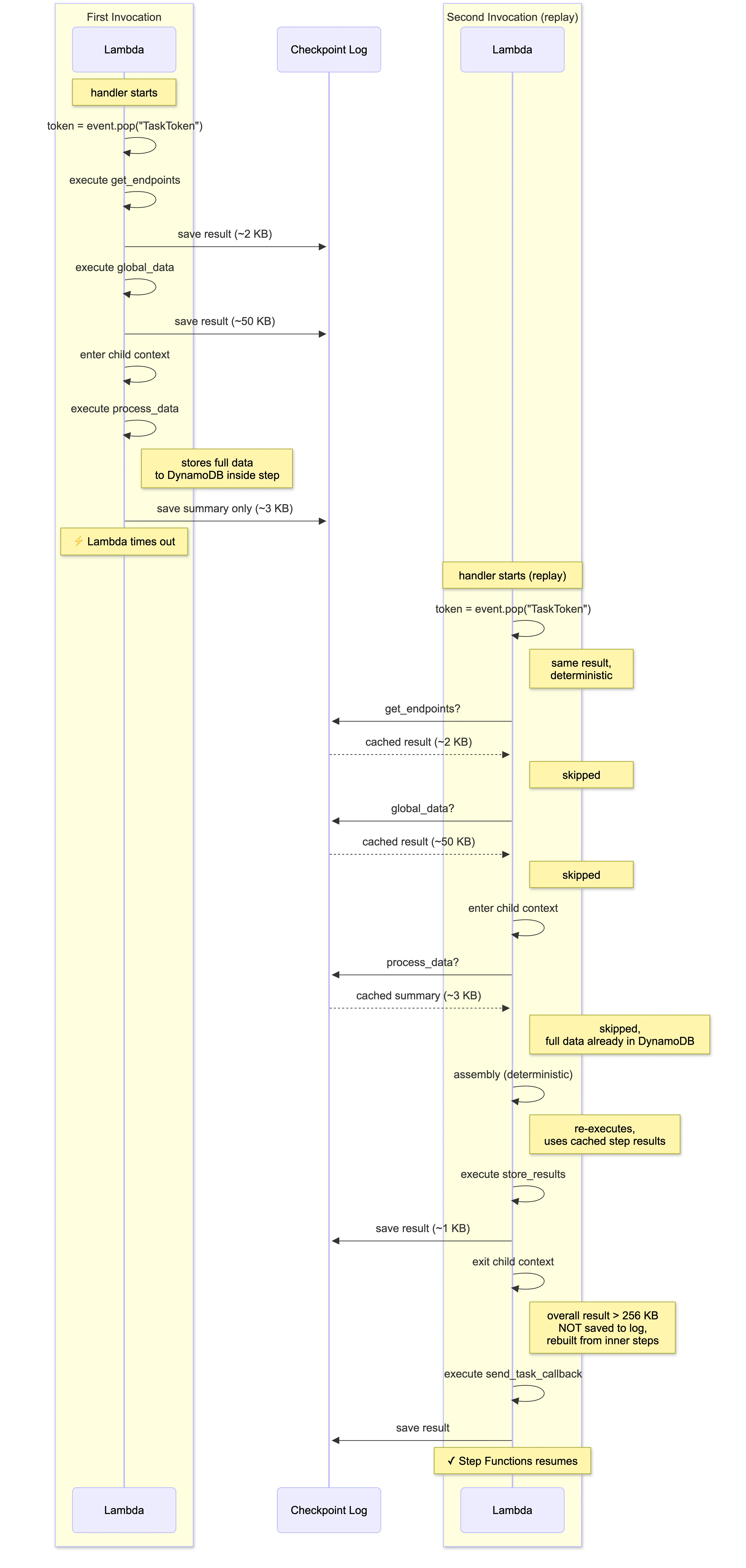
The Final Pattern
Here is the complete integration pattern, as it runs in production:
And here is the CDK configuration for a durable function in the workflow:
# 1. Declare durable_config in the Function constructor
fn = _lambda.Function(
    scope, "MyFunction",
    runtime=_lambda.Runtime.PYTHON_3_14,
    handler="handler.handler",
    code=_lambda.Code.from_asset(lambda_path),
    timeout=Duration.minutes(15),
    durable_config=_lambda.DurableConfig(
        execution_timeout=Duration.hours(1),
        retention_period=Duration.days(3),
    ),
)

# 2. Add IAM policy, Step Functions callback permissions, version, and alias
alias = _make_durable(fn)

# 3. Use WAIT_FOR_TASK_TOKEN + EVENT invocation in Step Functions
task = tasks.LambdaInvoke(
    scope, "MyTask",
    lambda_function=alias,  # must use the alias (qualified ARN)
    integration_pattern=sfn.IntegrationPattern.WAIT_FOR_TASK_TOKEN,
    invocation_type=tasks.LambdaInvocationType.EVENT,
    payload=sfn.TaskInput.from_object({
        "TaskToken": sfn.JsonPath.task_token,
        # ... your payload fields
    }),
    result_path=sfn.JsonPath.DISCARD,  # result comes via callback
    heartbeat_timeout=sfn.Timeout.duration(Duration.hours(1)),
)
Lessons Learned
After going through this process, a few things stood out.
You cannot synchronously invoke a durable function with a timeout greater than 15 minutes. You need WAIT_FOR_TASK_TOKEN with invocation_type=EVENT. This is probably the first thing anyone will bump into, and the error message is at least clear about it.
The @durable_execution decorator must be on the Lambda entry point. The durable runtime replays from the decorated function directly, so the decorator needs to be on the function that Lambda actually calls.
SendTaskSuccess must be a durable step. If it sits outside the durable context, it will not execute on replay. If it is not checkpointed, it might execute twice.
event.pop("TaskToken") is safe before durable steps. It is deterministic, same input produces same result on replay. No need to wrap it in a step.
Keep step return values under 256 KB. If a step produces large data, use run_in_child_context to group the production and consumption of that data into a child context. Inner steps keep their checkpoints, but the child context’s overall result is not subject to the limit. The SDK re-runs the child code on replay, resolving inner steps from the log without re-executing them.
Child contexts don’t protect inner step checkpoints from the 6 MB Lambda payload limit. run_in_child_context only skips checkpointing the child’s return value. Inner steps are still individually checkpointed. If an inner step returns large data, store it in DynamoDB or S3 inside the step and return only a lightweight summary.
Recreate boto3 sessions inside every step. Sessions are not serializable and STS credentials expire. A fresh session per step handles both issues cleanly.
You can mix durable and standard Lambdas in the same workflow. Since _lambda.Alias implements IFunction, adding a durable function to an existing Step Functions workflow does not require touching the other tasks. You just wire it in alongside the standard Lambdas.
My Take on Durable Functions vs Step Functions
After working with this integration for a while, I have a few personal observations.
The most notable thing about durable functions is that the heavy lifting happens entirely in code. The AWS-side configuration is minimal: you toggle a flag on the Lambda, add a policy, create an alias. Everything else, the checkpointing, the step definitions, the error handling, the callback logic, lives in your application code. Compare this with Step Functions, where most of the workflow logic is expressed through ASL (Amazon States Language) definitions and AWS console configuration.
This makes durable functions especially attractive for developers. If you are someone who thinks in code and prefers to have the full workflow logic visible in your IDE, you are going to like this model. On the other hand, if you come from an operations background and prefer visual workflows, drag-and-drop designers, and declarative configuration, Step Functions is probably still the more comfortable tool.
There is obviously no universal winner here. Every architecture needs to be designed for its specific use case. In my case, the function already contained complex business logic, so durable functions seemed appealing because in theory I would not have to restructure the code. As I described above, reality was a bit more nuanced than that. The workflow logic was already in the code; durable functions just made the code resilient. If I had been building something from scratch with lots of AWS service integrations (SQS, SNS, DynamoDB, parallel branches, human approvals), I would probably lean towards Step Functions and its native integrations.
The feature is new, and the main thing I noticed is the lack of practical examples for non-trivial integration patterns. The AWS documentation covers durable functions and Step Functions separately, but if you want to use them together you need to piece together information from the durable functions docs, the Step Functions integration patterns, and the best practices guide before you get a coherent picture. That is part of the reason I wrote this article.
I should also be honest about my own bias: my background is infrastructure and automation, not application development. The durable SDK patterns (checkpoint/replay, deterministic code outside steps, child contexts) were unfamiliar territory for me. Someone who writes application code daily might find them straightforward. Even so, for the right use case, durable functions let me keep all the logic in a single function instead of splitting into a fanout architecture, and the result is arguably simpler to reason about.
References
-
Lambda durable functions - Overview and how it works
-
Durable functions or Step Functions - When to use which
-
Invoking durable Lambda functions - Qualified ARNs, sync vs async
-
Best practices for Lambda durable functions - Determinism, idempotency, state management
-
Creating Lambda durable functions - Getting started tutorial
-
Deploy durable functions with IaC - CDK, SAM, and CloudFormation examples
-
Security and permissions for durable functions - IAM policies and checkpoint permissions
-
Step Functions service integration patterns - Request Response, .sync, and Wait for Callback
-
Lambda quotas - Invocation payload size limits (6 MB) and other quotas
Comments ·
Loading comments…
Sign in to leave a comment.