

My blog is a static site built with Astro. The build produces HTML files, an S3 bucket stores the files, and CloudFront serves them on my domain. I manage all the infrastructure with AWS CDK, and I write my CDK code in Python.
A static site is extremely comfortable to work with. To develop and preview the site locally, I start the Astro dev server with npm run dev, and I see the whole site at once, with nothing else to configure or to start. For this reason, I always avoided dynamic features: a backend would add extra work every time I develop the site locally.
Then AWS released AWS Blocks, a new framework that is still in preview, with a promise that matched my situation: the backend runs locally with no AWS account, and the same code deploys to AWS with no changes. I thought that AWS Blocks could give my blog a comment section without that extra work.
A comment section needs a real backend: an API, a database, authentication with GitHub and Google, an email for every new comment, and a moderation page that only I can use. For this reason, it was also a good use case to test AWS Blocks on a real need.
AWS Blocks Building Blocks and conditional exports
Versions used in this article.
@aws-blocks/blocks0.6.0,@aws-blocks/core0.5.0 and@aws-blocks/bb-auth-oidc0.2.0. AWS Blocks is in preview, so the behaviors described in this article can change in later versions.
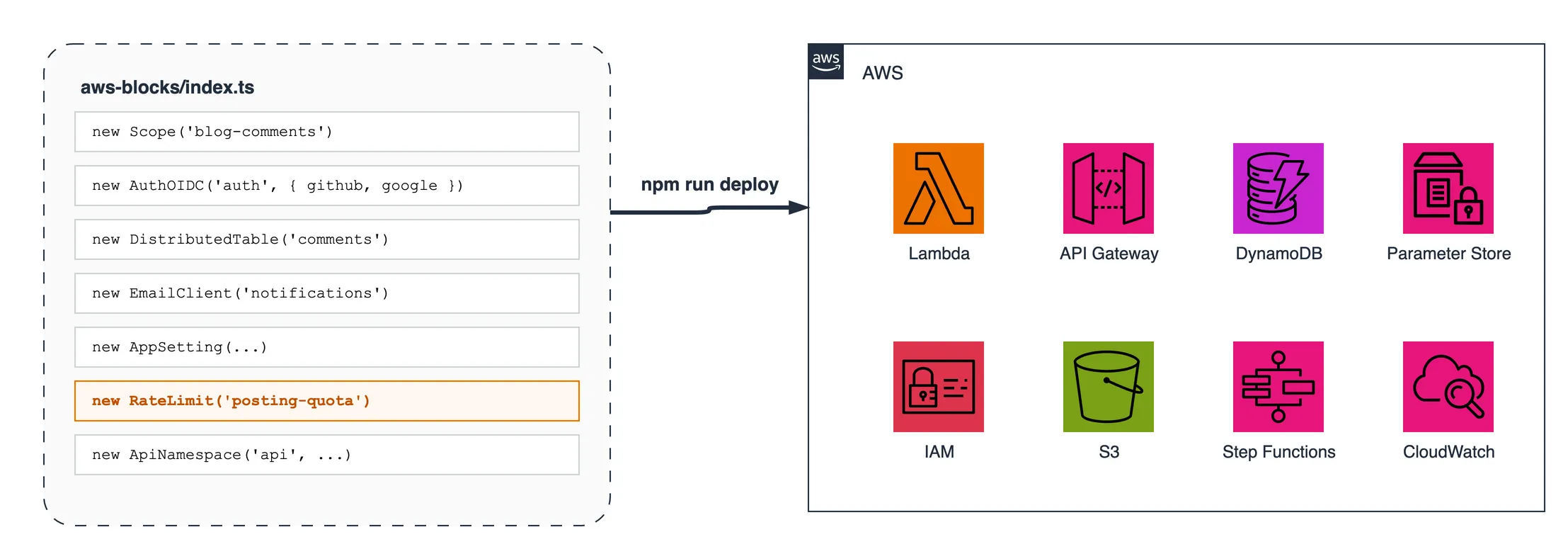
AWS Blocks is a TypeScript framework. TypeScript code runs on Node.js, the JavaScript runtime, and the framework itself is a set of npm packages for Node.js. A project has one backend file, aws-blocks/index.ts, and this file contains two kinds of code: declarations of the AWS resources, and the methods of the API, which are the functions that the frontend calls. These lines, for example, declare the table of the comments with a secondary index, and one method of the API:
const comments = new DistributedTable(scope, 'comments', {
  schema: commentSchema,
  key: { partitionKey: 'articleSlug', sortKey: 'commentId' },
  indexes: { byStatus: { partitionKey: 'status', sortKey: 'createdAt' } },
});

export const api = new ApiNamespace(scope, 'api', (context) => ({
  async approveComment(slug, id) { … },
}));
DistributedTable and ApiNamespace are Building Blocks. Every Building Block is an npm package with three main parts: a mock, which is a fake version of the resource for local development, the CDK construct that creates the AWS resource during the deploy, and the runtime code that calls the real resource in AWS through the AWS SDK.
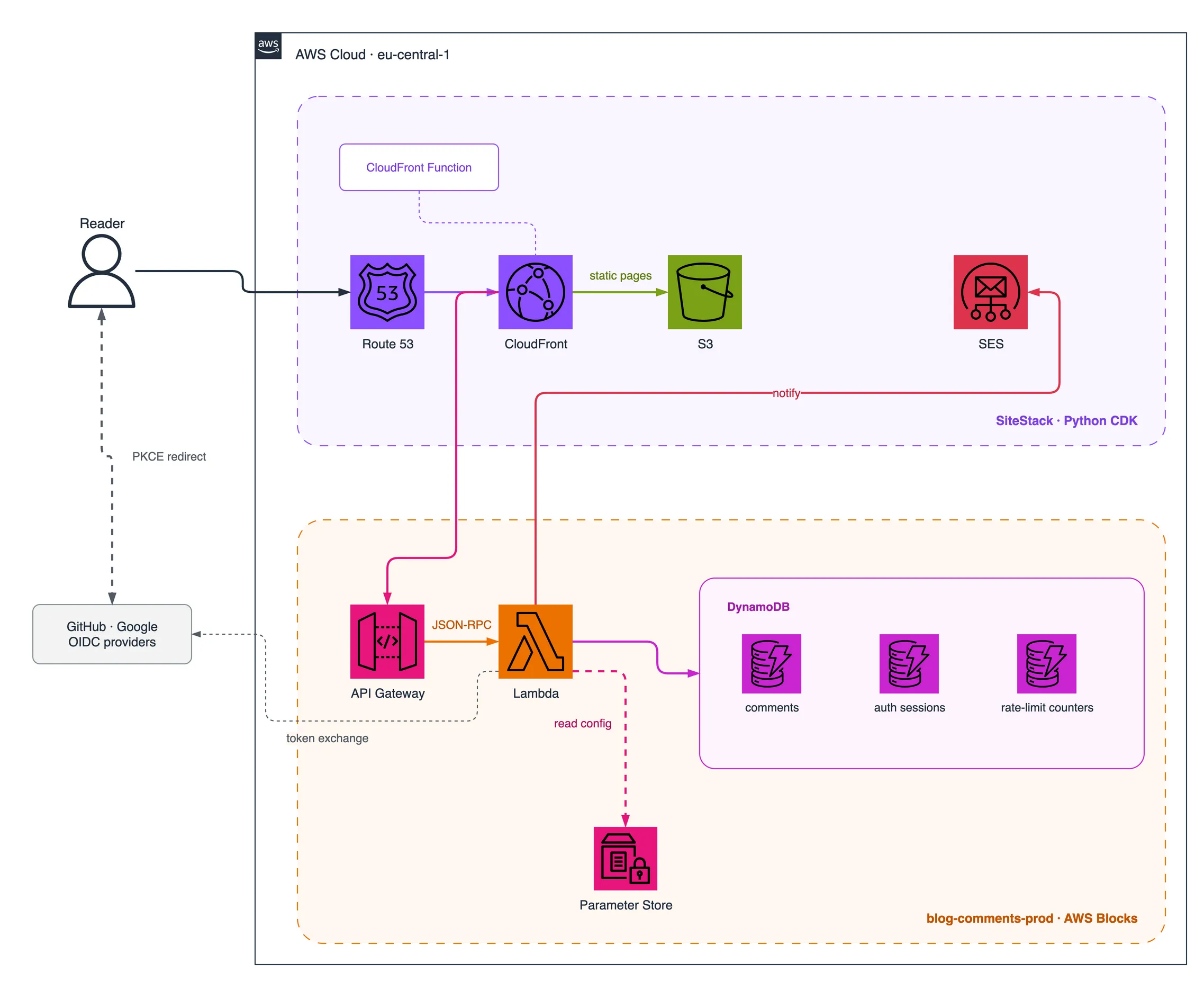
In AWS, the code of a backend needs a place where it runs. AWS Blocks uses AWS Lambda for this purpose: the whole backend runs in one Lambda function, and an API Gateway sends every request of the frontend to that function. The deploy creates both resources from the declaration new ApiNamespace(…).
The developer uses the backend file in three steps, in the order of the work:
- Local development. The developer runs the backend on the local computer with the dev server, a program included in AWS Blocks. The dev server receives the requests of the frontend and runs the methods of the API, like a real server, but it needs no AWS account. On the local computer,
new DistributedTable(…)creates the mock, which saves the data in local files. - Deploy. After the backend works locally, the developer deploys it to AWS with a CDK deploy. During the deploy, the command
cdk synthexecutes the file only to read the declarations, and it does not run the methods of the API. From each declaration,cdk synthcreates the CDK construct of the Block, and CloudFormation then creates the real resource in AWS. Fromnew DistributedTable(…), CloudFormation creates a DynamoDB table. Fromnew ApiNamespace(…), it creates the API Gateway and the Lambda function of the backend, and the deploy copies the backend file into that Lambda function. The developer writes no CDK code for these resources, because the CDK constructs are inside the Blocks. - Backend in AWS. After the deploy, the Lambda function of the backend has the role that the dev server had on the local computer. Each request of the frontend reaches API Gateway, API Gateway starts the Lambda function, and the Lambda function runs the backend file and the requested method. The DynamoDB table already exists, because CloudFormation created it during the deploy. For this reason, in the Lambda function
new DistributedTable(…)creates no resource: it creates an object that reads and writes the existing table.
The choice of the part happens inside Node.js, because the local dev server, cdk synth and the Lambda function are all Node.js processes. Each time the code imports a package, Node.js reads the exports field of the package.json of that package to decide which file to load.
This field is called conditional exports, because it can list a different file for each condition, and AWS Blocks activates a different condition in each of the three processes. The package of the KVStore Block, for example, declares four entries:
cdk          -> index.cdk.js      the construct
aws-runtime  -> index.aws.js      DynamoDB
browser      -> index.browser.js  the client side
default      -> index.mock.js     local development, file-backed
The browser entry is the file that the browser receives if the frontend imports the Block, and the three backend processes never load it.
The frontend uses the same mechanism. The directory aws-blocks/ is an npm workspace, which is a local package inside the same repository, and its package.json gives TypeScript the backend source and gives the browser a small client that the framework generates:
"exports": {
  ".": {
    "types": "./index.ts",
    "browser": "./client.js",
    "default": "./index.ts"
  }
}
The frontend then calls the backend with import { api } from 'aws-blocks' and await api.approveComment(slug, id). Every call becomes a JSON-RPC request to one endpoint (JSON-RPC is a simple protocol where each request contains the name of a method and its arguments), and the types of every method pass from the backend to the frontend with no client code to write or maintain.
Adding AWS Blocks to an existing AWS CDK repository
create-blocks-app is the command-line tool of AWS Blocks that creates new projects, and it also has a mode for existing projects: in a directory with a package.json, it adds the aws-blocks/ directory and a cdk.json, and it does not change the frontend. The CLI has no template for Astro, although the documentation lists Astro among the supported frameworks.
My repository has the site in astro/ and the Python CDK in infrastructure/, and the root had no package.json. I created one with npm workspaces for astro and aws-blocks.
At this step, the first limit of AWS Blocks appeared: the framework exists only in TypeScript. AWS CDK supports TypeScript, JavaScript, Python, Java, C# and Go, so a developer who writes CDK in Python, as I do, can expect AWS Blocks to support Python too, but the CDK code of AWS Blocks can only be TypeScript. For this reason, the backend needs its own CDK app in TypeScript and its own deploy, next to the Python CDK of my site, and it has its own directory, aws-blocks/, next to astro/ and infrastructure/.
The configuration of the dev server, which create-blocks-app generates, needed two changes. The documentation says that AWS Blocks detects the web framework automatically, but in the mode for existing projects the configuration starts the frontend with npx vite for every project, so I changed the command to npx astro dev. The CLI also leaves the existing dev script unchanged and adds the Blocks server as a separate script, dev:server, so npm run dev still starts a plain Astro server with no API. I changed dev to start the Blocks server, which then starts Astro.
With this change, my way of running the site in local development is slightly different. Before AWS Blocks, I ran npm install and npm run dev inside astro/. Now I run both commands at the repository root. At the root, npm run dev starts the Blocks dev server on port 3000, the Blocks dev server starts Astro on port 3100, and the browser uses port 3000. The old command inside astro/ still shows the pages, but the API and the sign-in do not exist there.
Local development with AWS Blocks and a stub OIDC provider
I built the whole backend locally with no AWS credentials: authentication, the table of the comments, the email notifications and the moderation workflow. For me, this local environment is the strongest part of AWS Blocks.
Authentication shows the quality of the local environment best. The authentication Block of AWS Blocks is AuthOIDC, which supports OIDC, the protocol behind the login buttons of Google and GitHub on many websites. Its providers github() and google() always call the real GitHub and Google, also locally, so they need registered OAuth apps and real secrets. The alternative is stubIdp(), a real OIDC provider that runs inside the local process. It signs tokens with RS256, publishes its public keys and a discovery document, and supports the authorization code flow with PKCE. The backend verifies its tokens with the same code that verifies the tokens of Google.
A stub can use the name of a real provider, so the switch between the stubs and the real providers is one condition in the declaration of AuthOIDC, and the frontend never changes:
providers: useStubIdp
  ? [stubIdp({ name: 'github', users: […] }), stubIdp({ name: 'google', users: […] })]
  : [github({ … }), google({ … })],
The email Block has a mock too. Locally, EmailClient sends no email: it prints each message and saves it in a JSON file. The content of every email can therefore be checked locally, but the real delivery through SES cannot.
The local environment has one limit for tests. The documentation suggests tests that import the API directly, but a direct import has no request and no session cookie, so it cannot test the methods that require authentication. My end-to-end tests send real HTTP requests to the local dev server instead.
Gaps in the AWS Blocks built-in Blocks
The built-in Blocks do not provide every behavior that an application needs, and the gaps appeared while I wrote the API.
Every ApiNamespace method is a public internet endpoint, with no authentication by default. The documentation states this rule clearly, but the local mock enforces nothing, so a method without an authorization check passes every local test and, after the deploy, anybody on the internet can call it.
AuthOIDC has no roles. It can only check that a user has a valid session, so the rule “only I can moderate” is application code: an allowlist of moderators in an AppSetting, the Block for configuration values, and a check in every moderation method. AuthOIDC also has no deny-by-default option, so every new method must remember its own check. My backend passes the API object through a wrapper that requires a moderator for every method outside an explicit list of public methods.
The moderator check reads the allowlist from SSM, so the wrapper keeps the result of the check in a cache for one request. This choice needed a read of the framework source. The part of the framework that receives each request and calls the method, called the dispatcher, calls the function passed to new ApiNamespace(…) again for every request, so a cache inside that function exists only for one request, and a cache at module level would give the authorization of one caller to the next caller. The documentation does not describe this behavior.
EmailClient creates no SES identity, although its DESIGN.md says that it does, so the SES identity is a separate resource. In my project, the SES domain identity is part of my existing Python stack.
DistributedTable has no update operation. A change to one field is a read, a change in memory and a new write, and between the read and the write another request can change the same row. The option ifFieldEquals makes the write conditional, so DynamoDB accepts the write only if the row is still in the expected state:
await comments.put(
  { ...existing, status: 'approved' },
  { ifFieldEquals: { status: 'pending' } },
);
Writing a custom AWS Blocks Building Block with KVStore composition
The documentation about custom Blocks describes them as reusable modules to share across projects and teams, and it suggests a private npm registry, such as AWS CodeArtifact, to share them inside an organization. This makes custom Blocks a natural tool for platform teams. A platform team can write Blocks that already contain the rules of the company, for example the rules about encryption or naming, and publish them in the registry of the company. The developers of the application teams then use those Blocks in the same way as the built-in Blocks, and every team follows the company guidelines without having to know every rule. Without shared Blocks, every developer or team creates the same resources in a different way, and the platform team must check every project against the guidelines.
My project has no platform team, but a custom Block was the right solution for one part of my backend. A public comment form needs a limit, so that one account cannot post hundreds of comments, and a rate limit is a general mechanism with no relation to comments: it receives a key and an allowance, and it answers yes or no. I implemented this limit as a Block of my own, RateLimit, with the base class BuildingBlockScope, which AWS Blocks exports for Block authors.
The four entries of KVStore are the complete contract of a Block: one file for each condition, and every file exports a class with the same name and the same methods. The documentation about custom Blocks describes a Block as an npm package with up to four exports, one for each execution context. A built-in Block needs all four files, because it owns its storage and must implement that storage for each environment. A custom Block can avoid most of this work with composition: it uses a KVStore inside it instead of its own table, as AuthOIDC does for its sessions. The custom Block calls only get() and put() on the KVStore, and the KVStore decides where the data goes. For this reason, my Block needs only two files: a CDK file that extends BuildingBlockScope, and one runtime file for Lambda and for local development.
// index.cdk.ts, the CDK file
export class RateLimit extends BuildingBlockScope {
  readonly store: KVStore;

  constructor(scope: ScopeParent, id: string, _options?: RateLimitOptions) {
    super(id, { parent: scope, vpc: {} });
    this.store = new KVStore(this, 'counters', { ttl: true });
  }
}
The constructor of BuildingBlockScope requires the VPC needs of the Block. My Block declares an empty object, because its only resource is the table of the KVStore, and KVStore declares its own VPC endpoint.
With composition, the Block receives for free the DynamoDB table, TTL, conditional writes, the IAM permission and the local mock. The only code I wrote is the logic of the limit: one row per user with an hourly counter and a daily counter, and a TTL that deletes the row of an inactive user. The application uses the custom Block in the same way as a built-in Block:
const postingQuota = new RateLimit(scope, 'posting-quota', { perHour: 10, perDay: 30 });AWS resources created by an AWS Blocks backend file
The first version of aws-blocks/index.ts that worked, locally and on AWS, had about 200 lines of code, and the deployed stack has 72 CloudFormation resources. This table shows what each declaration creates in AWS:
| In the file | In AWS |
|---|---|
AppSetting with value (2) | 2 SSM String parameters |
AppSetting with secret: true (4) | 4 SSM SecureString parameters, written by a framework custom resource |
new AuthOIDC(…) | a DynamoDB table for sessions, an SSM SecureString for the cookie signing key, and the routes of the OIDC flow |
new DistributedTable(…) | a DynamoDB table with one global secondary index managed by a custom resource |
new RateLimit(…) (custom) | a DynamoDB table with TTL, through the KVStore inside the Block |
new EmailClient(…) | the permission to send email through SES, but no SES identity |
new ApiNamespace(…) | a Lambda function behind an API Gateway REST API |
The file contains no IAM policy written by hand, because each Block gives the Lambda function access to its own resources. This benefit comes from CDK: the grant methods of CDK constructs, for example table.grantReadWriteData(fn), already create the IAM policies with no hand-written statements. AWS Blocks uses the same mechanism, and its only contribution is the automatic call to the grant for every Block.
The ids of the Blocks are permanent. The string 'comments' becomes part of the physical name of the table, so a rename of the id creates a new empty table and deletes the old table with its data. The documentation states this risk clearly in the page about AWS Blocks concepts.
Lambda functions and custom resources in an AWS Blocks stack
The 72 resources include more than the resources in the table. The stack contains ten Lambda functions, one S3 bucket and one Step Functions state machine, and only one of the ten functions runs the application.
The S3 bucket stores one file, blocks-config.json, of about one kilobyte, and the file contains only the names of the SSM parameters. At runtime, the code reads the file to find the names. To publish this file, the stack needs six resources: the bucket, its policy, a BucketDeployment custom resource with its Lambda function, a Lambda layer with the AWS CLI, and an S3AutoDeleteObjects custom resource with its Lambda function.
The Step Functions state machine belongs to the secondary index of DistributedTable. The framework does not declare the index in the AWS::DynamoDB::Table resource, but it creates the index with a custom resource that checks the status of the index until the index is active. The framework does not document the reason, and a possible reason is a limit of CloudFormation, which allows only one change to the indexes in each update of an existing table. The cost is five Lambda functions and a state machine, although at creation AWS::DynamoDB::Table accepts several indexes, and my table has one index, created together with the table.
The secrets also use a custom resource, and in this case the custom resource is necessary: AWS::SSM::Parameter does not support the SecureString type, so a Lambda function of the framework writes the five SecureString parameters. The value of a secret therefore never appears in the template.
The code that a developer writes is small and clear, but the stack around that code contains many more resources than I expected: nine of the ten Lambda functions exist only for the deploy and for the removal of the stack. Every resource does its job, but the list of resources looks cluttered.
AWS Blocks with an existing CloudFront distribution
The app that create-blocks-app generates contains a Hosting construct by default, and Hosting creates a CloudFront distribution and an S3 bucket for the frontend. My site already had both, so I removed the construct. The construct performs three jobs, and the generated code mentions none of them, so the source of Hosting is the only place that shows them:
- it creates the CloudFront behaviors for the API routes;
- it publishes the file
/.blocks-sandbox/config.json, which the browser client reads to find the URL of the API; - it gives the Lambda function the variable
BLOCKS_PUBLIC_ORIGIN, with the public address of the site.AuthOIDCuses this address to build the OAuth callback URL, so withoutHostingthe variable must be set by hand on the Lambda function.
I replaced the configuration file with a static file in the site. For the CloudFront behaviors, the best reference was the method Hosting.addApiBehaviors() in the source of the package: the origin path must contain the stage of API Gateway, the origin request policy must forward the cookies and every header except Host, because API Gateway accepts only its own domain, the cache must be disabled, because every response of the API depends on the session of the user and a cache could serve the response of one user to another user, and the behavior must accept POST, because every JSON-RPC call is a POST. The documentation for existing projects does not describe these settings.
With this configuration, the site and the API have one address, so no CORS configuration is necessary. The only value that passes between the CloudFormation stack of AWS Blocks and the stack of my site is the domain of API Gateway: the Blocks stack writes it to an SSM parameter, and my Python stack reads it.
AWS Blocks tooling and documentation problems
During the integration I met many small problems in the tooling around the Blocks. None of them was difficult to solve, but together they cost more time than the backend code.
- Documentation that contradicts itself. The README of
stubIdpsays in one example that the stub approves automatically, but without theonAuthorizeoption the stub shows a page where the user chooses an account. The README ofbb-app-settingdocuments a local path that does not exist. - A guidance file that is never installed. The framework tells AI coding agents to follow its instructions, but the file
AGENTS.mdexists only inside thecreate-blocks-apppackage, and the mode for existing projects does not copy it. - An undeclared dependency. The dev server needs
typescriptat runtime, but the mode for existing projects does not add it to the dependencies. - A duplicated core package. A clean install creates 22 copies of
@aws-blocks/core, and only a direct dependency on the package solves the problem. - A
.gitignorethat exposes local secrets. The generated rules do not exclude.bb-data/, and that directory contains the local values of every secret. - Confusing secret management. The first deploy writes a random placeholder into every secret
AppSetting, and the developer must set the real values after the deploy. The commandnpm run secretmanages Secrets Manager, but theAppSettingsecrets are stored in SSM, so the correct command isaws ssm put-parameter. - A required file that only the scaffolder creates.
cdk synthfails without astackIdin.blocks/config.json, and in the mode for existing projects nothing writes it.
The generated client had the most serious consequence. The file aws-blocks/client.js is generated by the dev server, and it is in .gitignore, so a fresh copy of the repository cannot build until the dev server has run once. My CI pipeline would have failed at the first build after the integration. The command npx blocks-generate-client generates the client without the dev server, but the getting-started documentation does not mention it.
Deploying an AWS Blocks backend to AWS
The first deploy took 634 seconds, and later updates take about 40 seconds. At the end, real GitHub and Google sign-in worked on my domain, and SES sent the notifications, but the deploy also revealed a significant problem that the local tests could not show.
The problem comes from the two runs of the backend file. AWS Blocks runs aws-blocks/index.ts once during cdk synth, on the machine of the deploy, and once in the Lambda function, when a request arrives. The environment variables of the deploy terminal exist during the synth, but they do not exist in Lambda. Any value that the code reads from process.env at the top of the file is therefore correct at deploy time and wrong at request time. In local development, both runs happen in the same terminal, so the local environment cannot show the problem, and the documentation does not warn about it.
In my project, this behavior put the fake identity provider in production. My code chose the real providers only if a variable was true, and I deployed with the variable set in my terminal. In the Lambda function the variable did not exist, so the live sign-in used the stub, and nothing produced an error. The fix inverts the flag, as in the snippet of the local development section: a missing variable now means real sign-in, and only the local dev script sets useStubIdp for the stub. The general rule is that the unsafe choice must be the one that needs a variable.
Securing an AWS Blocks backend on the public internet
In an AWS Blocks stack, no layer before Lambda refuses a request: CloudFront only routes, and API Gateway has no authorizer. Every request, also a request from an attacker, starts the Lambda function, and all the authorization checks are application code. One default is correct from the start: the session cookie is SameSite=Lax, Secure and HttpOnly. I checked the live stack for other problems, and I found two missing details in the modules and two defaults that need a change.
AWS Blocks dispatcher calls inherited JavaScript methods
The backend API is one JavaScript object, the object that the function passed to new ApiNamespace(…) returns, and each method of the application is a property of that object. The browser request contains the name of the method as text, and the framework uses that text to find the function in the object.
A JavaScript object also has inherited properties, for example toString and valueOf, which every ordinary object receives from Object.prototype. The framework only checks that a property with the given name exists, so a request for api.toString finds a real function, and the framework calls it with no authentication:
api.constructor  -> {"result":{}}
api.toString     -> {"result":"[object Object]"}
api.__proto__    -> 500, "apiMethods[rpcMethod] is not a function"
The impact is limited, because the inherited functions read no data and change nothing. The API still offers endpoints that the author never wrote, and one of them returns an internal error message. I fixed the problem in my application with an API object that has a null prototype, but every AWS Blocks application has this behavior by default.
AuthOIDC session rows without DynamoDB TTL
DynamoDB TTL deletes old rows automatically, but it needs two parts: a TTL configuration on the table, and an expiry attribute on every row. KVStore supports both parts, with { ttl: true } on the table and ttlSeconds on put(), and my RateLimit Block uses both.
AuthOIDC also stores its sessions in a KVStore, but in a different one. Every Block that uses a KVStore creates its own table and chooses its own options, so the TTL setting of my RateLimit Block applies only to the table of RateLimit. AuthOIDC creates its session store inside the code of the framework without the ttl option, and it writes every session without ttlSeconds. It uses neither part, so the session rows are never deleted:
blog-comments-posting-quota-counters   TimeToLiveStatus: ENABLED    <- my RateLimit Block
blog-comments-auth-sessions            TimeToLiveStatus: DISABLED   <- AuthOIDC
An expired session does not work, but the row stays in the table forever. The application cannot add this missing detail, because the change must happen in the package of the AuthOIDC Block. My own Block also shows that the missing detail comes from the code of AuthOIDC and not from the framework design: in the same stack and with the same base class, the correct TTL setting needed two options.
Lambda timeout and API Gateway throttling defaults in AWS Blocks
The Lambda function of the API receives a timeout of 900 seconds, the default of the framework, which is wrong for a public API. On a new AWS account with a limit of 10 concurrent executions, ten slow requests could block every Lambda function in the account for fifteen minutes. API Gateway stops waiting for the Lambda function after 29 seconds by default, but the Lambda function continues to run until its own timeout. I lowered the timeout to 30 seconds with a CDK escape hatch, which gives direct access to the CloudFormation properties of the function.
const cfnFunction = blocksStack.handler.node.defaultChild as lambda.CfnFunction;
cfnFunction.timeout = 30;
The property handler of the Blocks stack is the Lambda function of the API, so the change applies only to that function and not to the other nine Lambda functions.
The API Gateway stage has a default throttle of 1000 requests per second. The limit is global, so a flood blocks real readers too. BlocksStack, the CDK stack that AWS Blocks generates, offers the REST API through its gateway property, so a lower limit needs one line.
Final verdict on AWS Blocks in preview
AWS Blocks kept its main promise: I developed and tested the whole backend locally, as easily as the rest of the site. The local tests do not replace a careful review of the deploy, and the complete project, from the local environment to the live stack in AWS, also showed where the framework is strong and where it is still weak.
AWS Blocks strengths
- The three-in-one design. One package contains the construct, the runtime code and the mock, so the local environment needs no extra work.
- A local environment with real protocols.
stubIdp()is a real OIDC provider, and the mocks accept the same calls as the real Blocks. - Types from the backend to the frontend with no client code to write or maintain.
- Very little code for a lot of infrastructure, with the CDK grants applied automatically for every Block.
- Extension by composition. A custom Block that uses a built-in Block needs two files instead of four.
AWS Blocks weaknesses and rough edges
- Public methods by default, with no warning from the local tests.
- Two runs of one file, at synth and in Lambda, with different environment variables and no warning in the documentation.
- Missing details in young modules: the dispatcher does not exclude inherited methods, which has a limited but real security impact, and
AuthOIDCdoes not enable TTL on its sessions. AWS Blocks is a young project, and details of this kind will probably arrive in future versions. - Gaps in the built-in Blocks: no roles and no deny-by-default in
AuthOIDC, no update inDistributedTable, and no SES identity inEmailClient. - Tooling for new projects only: a default
Hostingconstruct, a dev server hardcoded to Vite, a generated client that breaks CI, and packaging problems. - Many more resources than expected: nine of the ten Lambda functions exist only for the deploy and for the removal of the stack, and the stack looks cluttered.
- TypeScript only, for now. The choice is natural for a developer who already writes TypeScript, but a project with CDK in Python, like mine, now has part of its CDK in Python and part in TypeScript, and this split feels strange. With the AI coding tools of 2026, the language is no longer a real barrier, and AWS Blocks is new and still in preview, so I expect support for other languages in the future, and I am curious to see which languages AWS chooses.
The extension model is better than I expected, because a custom Block with a real resource needed only two small files, and the local environment works as the documentation promises. The most serious problem is the two runs of the same file, because a wrong value in the Lambda function produces no error message. My recommendation is to use the local environment as much as possible, and to review the deploy configuration line by line. AWS Blocks is still in preview, and I expect most of the rough edges in this article to disappear before the general availability.
Comments ·
Loading comments…
Sign in to leave a comment.