

I built a CDK stack that deploys an Amazon Bedrock AgentCore gateway. Declaring the resources was quick. The slow part was getting them created in the right order, with each resource’s permissions in place at the moment it is created. The AgentCore CDK constructs look complete, so the trouble was in the timing and the IAM, below the construct API.
This post collects the points that made me stop and work out why, the ones worth knowing before you build one of these. They follow a small stack I actually deployed, so every snippet below is real code that ran, in us-east-1, and they come in roughly the order you meet them, from the first synth to the last deploy.
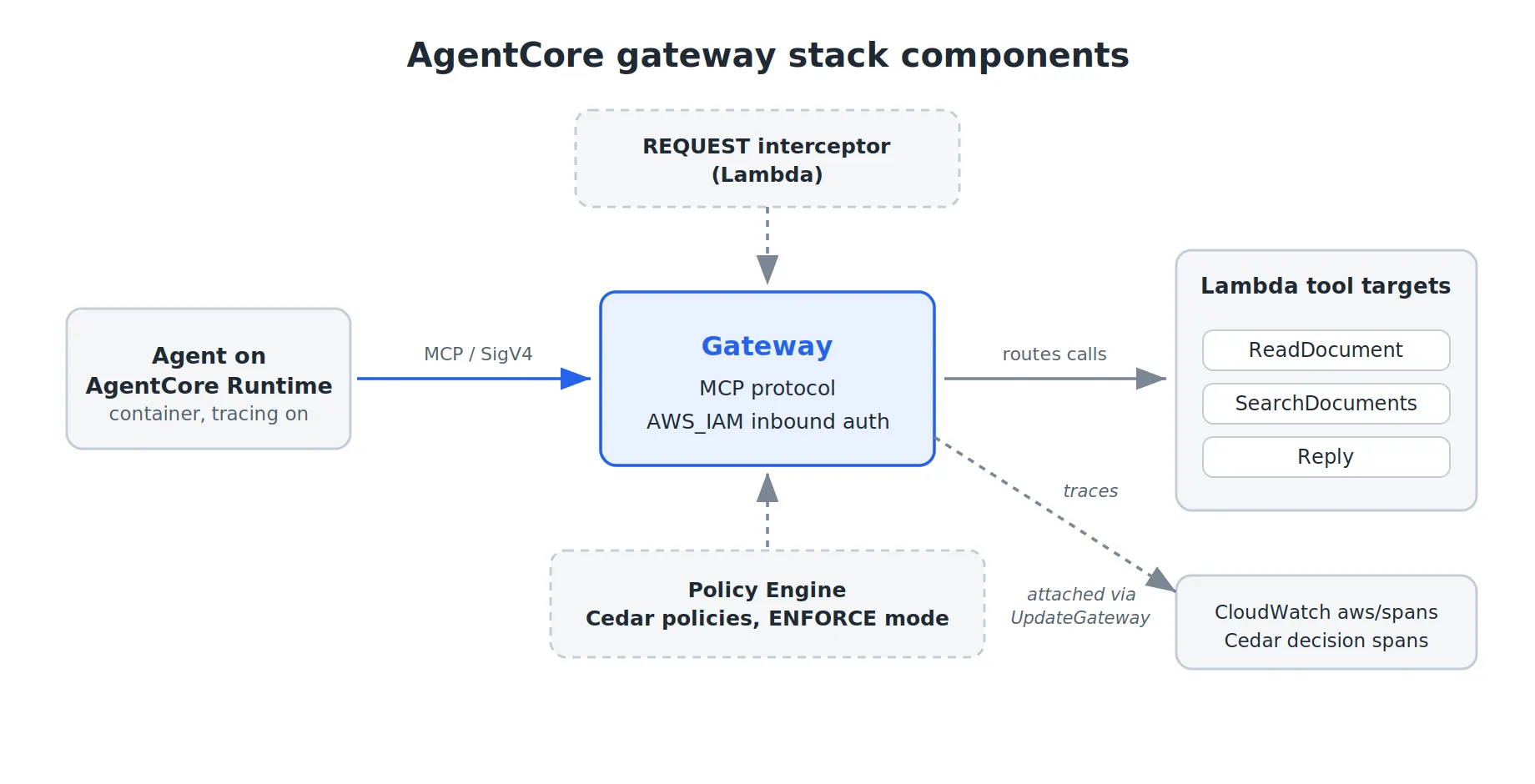
An agent runs on the AgentCore Runtime, a managed host for its container, and reaches its tools through the gateway. The gateway speaks MCP, the protocol the agent’s client uses to list and call tools, and it exposes three Lambda functions as tools: read a document, search documents, and post a reply. These three are placeholders for real tools, so the part that matters is how they connect to the gateway.
The gateway has two controls: a Cedar policy engine that authorizes each tool call in ENFORCE mode, so any call no policy permits is denied, and a request interceptor, a Lambda the gateway calls before each tool call to inspect, block, or rewrite it. Traces from the gateway and the runtime go to CloudWatch.
Pin the CDK environment to fix “Unrecognized resource types”
Before any resource is created, the deploy can fail at the handoff from synthesis to CloudFormation, on an error that lists every AWS::BedrockAgentCore::* type in the stack as unrecognized:
Template format error: Unrecognized resource types:
[AWS::BedrockAgentCore::Policy, AWS::BedrockAgentCore::Gateway,
 AWS::BedrockAgentCore::Runtime, AWS::BedrockAgentCore::GatewayTarget,
 AWS::BedrockAgentCore::PolicyEngine]
The constructs are in the library and cdk synth passes, so this reads as an AgentCore problem, but the cause is the environment.
A stack with no env is environment-agnostic: the account and region become the AWS::AccountId and AWS::Region tokens, so the template can deploy to any account or region. This is the default, and easy to leave in place, since nothing makes you set a region until something region-specific breaks. The app.py that produces the error looks like this:
app = cdk.App()
GatewayStack(app, "GatewayStack")  # no env, so environment-agnostic
app.synth()
Resource types are registered per region, and AWS documents that their availability can vary by region. The AgentCore types are new, so they are in only some regions, with us-east-1 among them. With no env, the stack has no region of its own and deploys to wherever the CLI is pointed, which is not always where you mean. Setting the environment is the kind of step you skip exactly because it feels too obvious to matter, and that is how I got here: the CLI defaulted to another region, the template went there, and the AgentCore types were not registered in it. The error threw me for a moment, since it names AgentCore and says nothing about a region, so it is worth writing down.
Setting env pins the region, so the deploy stops following the CLI default and lands where the AgentCore types exist. The account comes from CDK_DEFAULT_ACCOUNT, filled in by the CDK CLI from your credentials, and the region is set explicitly:
app = cdk.App()
GatewayStack(
    app,
    "GatewayStack",
    env=cdk.Environment(
        account=os.environ.get("CDK_DEFAULT_ACCOUNT"),
        region="us-east-1",
    ),
)
app.synth()
When a new resource type shows as unrecognized and the construct is in the library, check that the stack has an explicit
envbefore you suspect the service. The error names AgentCore; the fix is one line in app.py.
Set the MCP versions and session config at gateway creation
The gateway is next. Its protocol config sets the terms of the MCP handshake with the agent’s client: which versions it accepts and how it keeps a session. Two of those settings decide whether the client connects, and neither shows up until it tries. The first is the MCP version. The agent is built with strands-agents, an SDK for building agents, and its MCP client uses the mcp package (1.8 and up), which speaks 2025-11-25. The CDK version enum stops at 2025-06-18, so the client and gateway do not agree and the gateway returns a 500. Automatic MCP version negotiation does not help; it returns the 500 instead of stepping down to a shared version.
The second is the session config. With no sessionConfiguration, the gateway does not answer the MCP initialize call, so the handshake fails on the first message, again with a 500 that looks like a version mismatch. Since the 500 points at versions, this one is easy to blame on the version list.
Both go in at creation, through the L1 escape hatch, because the L2 supported_versions prop is typed on the enum and rejects a raw string. The interceptor_configs value in the call is built later, in the interceptor section:
gateway = agentcore.Gateway(
    self,
    "SupportGateway",
    gateway_name="support-tools-gateway",
    protocol_configuration=agentcore.McpProtocolConfiguration(
        instructions="Customer support tools",
        supported_versions=[
            agentcore.MCPProtocolVersion.MCP_2025_03_26,
            agentcore.MCPProtocolVersion.MCP_2025_06_18,
        ],
    ),
    authorizer_configuration=agentcore.GatewayAuthorizer.using_aws_iam(),
    interceptor_configurations=interceptor_configs,
)

# The CDK enum stops at 2025-06-18. The gateway service already supports
# 2025-11-25, and the mcp SDK 1.8+ (pulled in by strands-agents) uses it
# by default, so add it through the L1 escape hatch as a raw string.
cfn_gw = gateway.node.default_child
cfn_gw.add_property_override(
    "ProtocolConfiguration.Mcp.SupportedVersions",
    ["2025-03-26", "2025-06-18", "2025-11-25"],
)
# Without a session config the gateway does not answer the MCP 'initialize'
# method, and the client handshake gets a 500 on the first message. A
# one-hour timeout turns sessions on.
cfn_gw.add_property_override(
    "ProtocolConfiguration.Mcp.SessionConfiguration",
    {"SessionTimeoutInSeconds": 3600},
)
Everything inside
protocolConfiguration, the protocol type, the supported versions and the session config, is immutable on an existing gateway. Change any of it and the deploy fails with “Protocol type cannot be updated for an existing gateway”, and the only way forward iscdk destroyand recreate. Decide these once and leave them alone, because during iterative work a one-line change to the version list becomes a full teardown.
Name the gateway targets to match your Cedar actions
Each tool the agent can call is a Lambda function, wired onto the gateway as a target, and the target’s name matters more than it looks. It becomes the first half of the Cedar action, joined to the tool name by a triple underscore, so ReadDocument plus read_document gives the action ReadDocument___read_document. Get the name wrong and the Cedar policy will not match it later.
agentcore.GatewayTarget.for_lambda(
    self,
    "ReadDocumentTarget",
    gateway_target_name="ReadDocument",
    gateway=gateway,
    lambda_function=tool_fns["read_document"],
    tool_schema=agentcore.ToolSchema.from_inline([
        agentcore.ToolDefinition(
            name="read_document",
            description="Read a document by its id",
            input_schema=agentcore.SchemaDefinition(
                type=agentcore.SchemaDefinitionType.OBJECT,
                properties={
                    "document_id": agentcore.SchemaDefinition(
                        type=agentcore.SchemaDefinitionType.STRING,
                        description="The unique identifier of the document",
                    ),
                },
                required=["document_id"],
            ),
        ),
    ]),
)
Import AgentCore constructs from the stable module
From the first cdk synth on, AgentCore constructs like EvaluationLevel and FilterOperator print a deprecation warning that points to aws-cdk-lib/aws-bedrockagentcore. This is the migration from alpha to stable: most of the AgentCore constructs have graduated to the stable module, and the alpha package now keeps them as deprecated aliases, so importing them from alpha is what triggers the warning. It reads like a newer version to chase, but the fix is just to update the import.
One submodule stays in alpha, the Policy module. The policy engine and the Cedar policy constructs live only there, so the clean split is to import the gateway, runtime, targets, and evaluators from aws-cdk-lib/aws-bedrockagentcore and keep the Policy pieces on aws-cdk.aws_bedrock_agentcore_alpha. That split is also why the next section does not set the policy engine on the gateway at creation: at least in aws-cdk-lib 2.261, the stable gateway has no L2 property for it, and the L1 escape hatch that would set it fails, so the policy engine is attached after creation through the control plane API.
Attach the Policy Engine with the UpdateGateway API
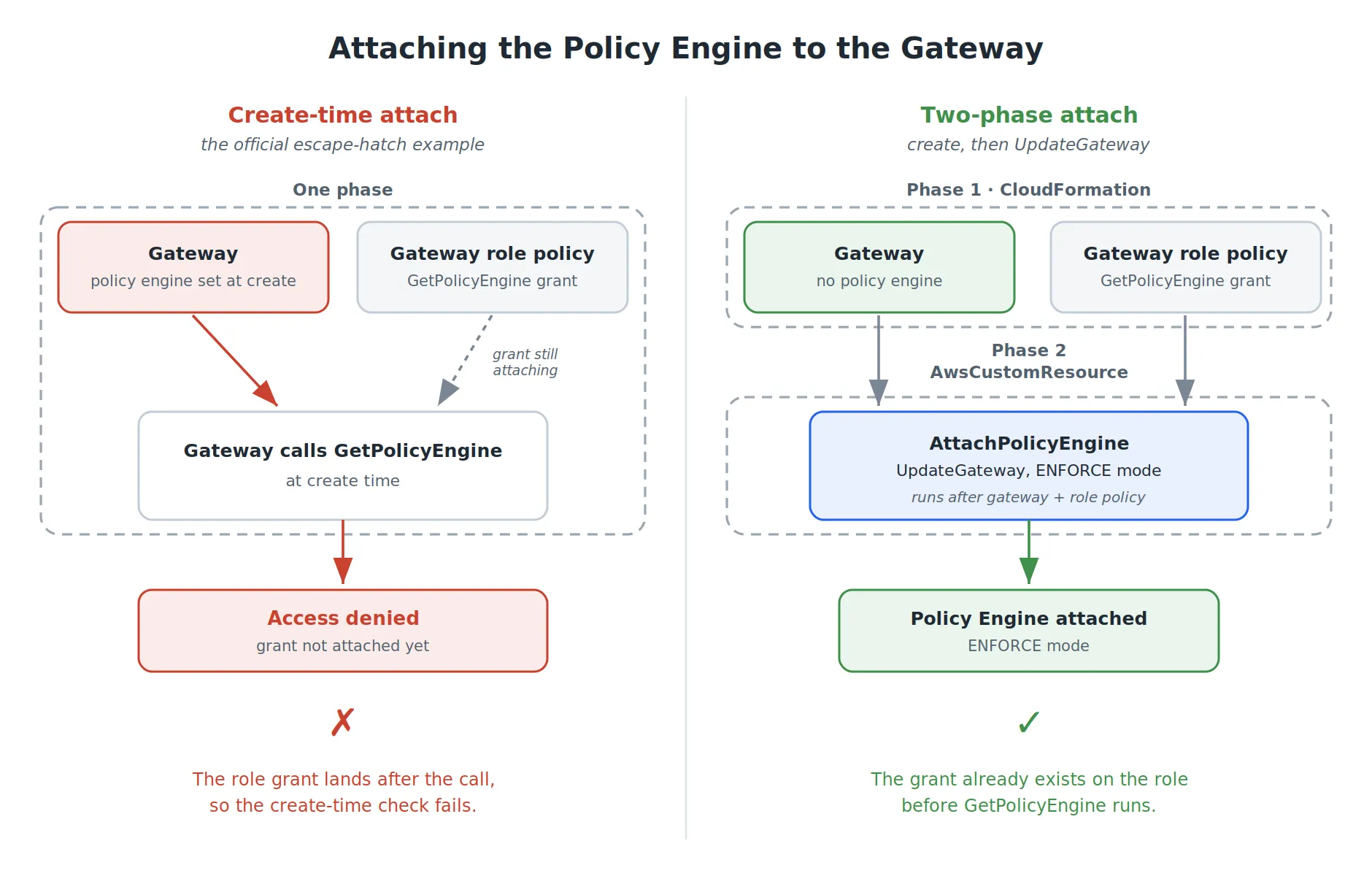
With the gateway and its targets in place, the next piece is a Cedar policy engine, attached in ENFORCE mode to authorize each tool call. The alpha Policy module has an escape hatch that sets policy_engine_configuration on the gateway directly, and the official example does exactly that, with a note that proper L2 support is coming later. Taken literally, in a single stack where the gateway role is created next to the gateway, that example does not deploy.
Access denied while calling GetPolicyEngine on Policy Engine ...
with Gateway role: arn:aws:iam::...:role/GatewayStack-SupportGatewayServiceRole...
Confirm this role has bedrock-agentcore:GetPolicyEngine permissions and retry
Most AWS resources do not check cross-resource permissions at creation, but the AgentCore gateway does. Created with a policy engine already attached, it calls GetPolicyEngine during creation, using its own service role. That role gets the grant from an inline policy, and CloudFormation creates the gateway and that inline policy in parallel, so the gateway’s call can happen before the permission is attached. The IAM permissions guide states that the execution role needs GetPolicyEngine, which is the grant that is not attached yet.
The obvious fix, adding a dependency so the grant is attached first, gives you a circular dependency instead. Once the gateway waits on its own role default policy, that policy sits in the same web as the targets, the Cedar policies, and the traces resources, all of which already point back at the gateway, and CloudFormation cannot order the graph. Two details matter here: cdk synth passes clean, so the cycle only surfaces when cdk deploy builds the changeset, and it forms even with the authorize actions on * (yep, I tried it), so widening the IAM does not avoid it.
The approach that works is to stop attaching the policy engine during creation. Create the gateway with no policy engine, then attach it with an AwsCustomResource that calls the UpdateGateway API once the gateway and its role policy both exist. AWS documents this update path for adding a policy engine to an existing gateway, so this is the documented flow. The grants go on the role first:
gateway.role.add_to_principal_policy(iam.PolicyStatement(
    actions=["bedrock-agentcore:GetPolicyEngine"],
    resources=[policy_engine.policy_engine_arn],
))
gateway.role.add_to_principal_policy(iam.PolicyStatement(
    actions=[
        "bedrock-agentcore:AuthorizeAction",
        "bedrock-agentcore:PartiallyAuthorizeActions",
    ],
    resources=[policy_engine.policy_engine_arn, gateway.gateway_arn],
))
The authorize actions are scoped to the policy engine ARN and the gateway ARN, the two the IAM guide asks for. This is the payoff of the two-phase attach: the gateway is created with no policy engine, so it never waits on its role default policy, and naming the gateway ARN in that policy no longer closes a cycle. The scoped grants deploy clean and the agent still authorizes. Then the attach itself:
update_params = {
    "gatewayIdentifier": gateway.gateway_id,
    "name": "support-tools-gateway",
    "roleArn": gateway.role.role_arn,
    "authorizerType": "AWS_IAM",
    "protocolConfiguration": {
        "mcp": {
            "instructions": "Customer support tools",
            "supportedVersions": ["2025-03-26", "2025-06-18", "2025-11-25"],
            "sessionConfiguration": {"sessionTimeoutInSeconds": 3600},
        }
    },
    "policyEngineConfiguration": {
        "arn": policy_engine.policy_engine_arn,
        "mode": "ENFORCE",
    },
    "interceptorConfigurations": interceptor_configs,
}

attach_policy_engine = cr.AwsCustomResource(
    self,
    "AttachPolicyEngine",
    on_create=cr.AwsSdkCall(
        service="bedrock-agentcore-control",
        action="UpdateGateway",
        parameters=update_params,
        physical_resource_id=cr.PhysicalResourceId.of("attach-policy-engine"),
    ),
    on_update=cr.AwsSdkCall(
        service="bedrock-agentcore-control",
        action="UpdateGateway",
        parameters=update_params,
        physical_resource_id=cr.PhysicalResourceId.of("attach-policy-engine"),
    ),
    install_latest_aws_sdk=True,
    policy=cr.AwsCustomResourcePolicy.from_statements([
        iam.PolicyStatement(
            actions=[
                "bedrock-agentcore:UpdateGateway",
                "bedrock-agentcore:GetGateway",
            ],
            resources=["*"],
        ),
        iam.PolicyStatement(
            actions=["iam:PassRole"],
            resources=[gateway.role.role_arn],
        ),
    ]),
)
attach_policy_engine.node.add_dependency(gateway)
default_policy = gateway.role.node.try_find_child("DefaultPolicy")
if default_policy is not None:
    attach_policy_engine.node.add_dependency(default_policy)
That custom resource waits on both the gateway and the gateway role’s default policy. The phase-2 UpdateGateway re-runs the same GetPolicyEngine check the gateway does at creation, so depending on the gateway alone can still leave the grant half-attached when the update fires.
Two things in that update_params block are easy to get wrong. UpdateGateway replaces the whole gateway state rather than patching the one field you passed, so sending only policyEngineConfiguration comes back with three validation errors at once: roleArn, name and authorizerType cannot be null. You resend every required field even though none of them are changing.
The subtle one is that the same full replace also drops protocolConfiguration if you leave it out. Creation set the supported versions and the session config a moment earlier, and if the update call omits protocolConfiguration, the attach quietly removes them. The deploy still succeeds and the gateway stays up, just with no versions and no sessions, so you find out much later when the client connects and gets a 500 with no obvious cause. That is why the update resends the same protocolConfiguration that creation used.
Because the call passes a roleArn, the custom resource’s own role needs iam:PassRole on the gateway role. That is easy to miss for something you think of as attaching a policy engine, and it fails the deploy until you add it.
The escape hatch in the construct example runs a create-time check you cannot satisfy in one stack: without ordering you hit the access-denied race, and with ordering you hit the circular dependency. The path that deploys is the control plane API, create then update.
Write Cedar policies for the AgentCore gateway tools
The policy engine does nothing until you give it Cedar policies, one permit per tool. The first trap is the action name, and the service’s own error message makes it worse. The action is the full target___tool form, so ReadDocument plus read_document is ReadDocument___read_document. Write that and, depending on state, the policy is rejected with “unrecognized action, did you mean PostExternal?”, which suggests a bare target name. Shorten it to follow that hint, and the next error is “attribute input in context not found”.
The full form is the one that works: the AgentCore tutorial uses RefundTarget___process_refund, and only the full form exposes context.input. The “did you mean” suggestion points to the short form and then rejects it, so trust the schema docs over the inline hint. Each policy is one permit per tool, loaded from a .cedar file with the gateway ARN substituted at synth time:
permit(
  principal,
  action == AgentCore::Action::"ReadDocument___read_document",
  resource == AgentCore::Gateway::"<gateway-arn>"
);
Creating the policies has its own ordering catch. IGNORE_ALL_FINDINGS sounds like it would let a policy go ahead of its target, but it only ignores Cedar validation findings, so a policy created before its target still fails with “Target does not exist in gateway”. The fix is an explicit dependency from every policy to the gateway:
agentcore_alpha.Policy(
    self,
    "ReadDocumentPolicy",
    policy_engine=policy_engine,
    policy_name="read_document",
    definition=definition,  # cedar text with <gateway-arn> replaced
    validation_mode=agentcore_alpha.PolicyValidationMode.IGNORE_ALL_FINDINGS,
)

for policy in policies:
    policy.node.add_dependency(gateway)
AWS documents the reason this ordering matters: Cedar policies that reference a specific gateway ARN need a two-phase deployment, because Cedar does not allow wildcard resources, so the gateway has to exist before the policy that names it. The explicit dependency is how you get that ordering inside one stack.
Wire a Lambda interceptor into the AgentCore gateway
A request interceptor is the next thing you might wire on. It is a Lambda the gateway runs before Cedar sees the call, and that order is the point: the interceptor enriches the request with what Cedar cannot fetch on its own, an external lookup or an attribute to authorize on, and Cedar then decides over the enriched call. AWS documents the pattern. The catch is the shape the Lambda has to return.
interceptor_configs = [
    agentcore.LambdaInterceptor.for_request(request_fn, pass_request_headers=True),
]
The input event has the raw request plus a parsed one with headers, path, method, and body, and the obvious move is to send that back with a small change. The output contract is narrower than the input, so for a pass-through you return a transformedGatewayRequest that carries only the body:
def build_allow_response(body):
    return {
        "interceptorOutputVersion": "1.0",
        "mcp": {
            "transformedGatewayRequest": {
                "body": body,
            },
        },
    }
The response carries the body and nothing else. Echo the original headers back and you resend a stale Content-Length computed on the old body, along with the original SigV4 Authorization, and the gateway errors out. The input and the output do not share a schema, so copying the input shape into your response is what breaks it.
One more, on the session id: do not set an Mcp-Session-Id header on requests, initialize included. The gateway generates the session id during initialize and returns it, and the client uses that value from then on. Set your own and the gateway stops recognizing the session on the next call, returns 404, and the client sees “Session terminated”. If your interceptor needs a stable per-session key, read the id the gateway returns, which holds for the whole session.
Enable CloudWatch Transaction Search for AgentCore traces
Tracing lets you follow a request through the gateway and the runtime after the fact. It runs on Transaction Search, an account-level setting you flip on once, and the console does that in a few clicks. Automating it in CDK is the bonus part, since you could finish it with a click and move on. But I have an allergy to clickops, so I would rather spend two hours automating a three-minute click. :)
Doing it in code has a catch. Turn on tracing on the runtime and the deploy tells you to enable CloudWatch Logs as the X-Ray trace segment destination. That reads like a single call, but it is the Enable Transaction Search procedure, and it pulls in a set of permissions you would not guess from the API you are calling.
The UpdateTraceSegmentDestination API page lists only xray:UpdateTraceSegmentDestination. The full list is on the enablement page under prerequisites: several xray actions, a handful of logs actions, application-signals:StartDiscovery, the two iam actions for the Application Signals service-linked role, and cloudtrail:CreateServiceLinkedChannel, plus a resource policy on the aws/spans log group so xray.amazonaws.com can write to it. Adding those one deploy at a time wastes hours, since each attempt surfaces a different missing permission, so take the whole list from the enablement page in one go.
The enablement also has state: the first UpdateTraceSegmentDestination moves it to PENDING, and a second call while it is PENDING is rejected, which an iterative deploy will hit constantly. Make the custom resource tolerant of finding the feature mid-transition:
cr.AwsCustomResource(
    self,
    "EnableTransactionSearch",
    on_create=cr.AwsSdkCall(
        service="XRay",
        action="UpdateTraceSegmentDestination",
        parameters={"Destination": "CloudWatchLogs"},
        physical_resource_id=cr.PhysicalResourceId.of("xray-transaction-search"),
        ignore_error_codes_matching=".*PENDING.*|.*InvalidRequest.*|.*already.*",
    ),
    install_latest_aws_sdk=True,
    policy=cr.AwsCustomResourcePolicy.from_statements([
        iam.PolicyStatement(
            sid="TransactionSearchXRayPermissions",
            actions=[
                "xray:GetTraceSegmentDestination",
                "xray:UpdateTraceSegmentDestination",
                "xray:GetIndexingRules",
                "xray:UpdateIndexingRule",
            ],
            resources=["*"],
        ),
        iam.PolicyStatement(
            sid="TransactionSearchLogGroupPermissions",
            actions=[
                "logs:CreateLogGroup",
                "logs:CreateLogStream",
                "logs:PutRetentionPolicy",
            ],
            resources=[
                "arn:aws:logs:*:*:log-group:/aws/application-signals/data:*",
                "arn:aws:logs:*:*:log-group:aws/spans:*",
            ],
        ),
        iam.PolicyStatement(
            sid="TransactionSearchLogsPermissions",
            actions=[
                "logs:PutResourcePolicy",
                "logs:DescribeResourcePolicies",
            ],
            resources=["*"],
        ),
        iam.PolicyStatement(
            sid="TransactionSearchApplicationSignalsPermissions",
            actions=["application-signals:StartDiscovery"],
            resources=["*"],
        ),
        iam.PolicyStatement(
            sid="CloudWatchApplicationSignalsCreateServiceLinkedRolePermissions",
            actions=["iam:CreateServiceLinkedRole"],
            resources=[
                "arn:aws:iam::*:role/aws-service-role/"
                "application-signals.cloudwatch.amazonaws.com/"
                "AWSServiceRoleForCloudWatchApplicationSignals"
            ],
            conditions={
                "StringLike": {
                    "iam:AWSServiceName": "application-signals.cloudwatch.amazonaws.com"
                }
            },
        ),
        iam.PolicyStatement(
            sid="CloudWatchApplicationSignalsGetRolePermissions",
            actions=["iam:GetRole"],
            resources=[
                "arn:aws:iam::*:role/aws-service-role/"
                "application-signals.cloudwatch.amazonaws.com/"
                "AWSServiceRoleForCloudWatchApplicationSignals"
            ],
        ),
        iam.PolicyStatement(
            sid="CloudWatchApplicationSignalsCloudTrailPermissions",
            actions=["cloudtrail:CreateServiceLinkedChannel"],
            resources=[
                "arn:aws:cloudtrail:*:*:channel/"
                "aws-service-channel/application-signals/*"
            ],
        ),
    ]),
)
Transaction Search is a single switch for the whole account, on or off, and these custom resources are written to respect that. The enable call ignores an “already on” error, so redeploying into an account where it is already enabled just passes, and it has no delete action, so tearing the stack down leaves Transaction Search on for everything else in the account. That is the point of doing it this way: you can destroy and recreate the stack as often as you like without flipping an account-wide setting on and off for everyone.
The permission list is the part that surprises you. A single
tracing_enabled=Trueon the runtime turns on a whole feature, and you find the permissions it needs on the feature’s enablement page rather than in the reference for the API you actually call. When a small flag sets off a large enablement, that is the page to read.
Export the AgentCore Runtime ARN from CDK
Anything that invokes the runtime from outside the stack, an operator UI or a script, needs the runtime ARN as a string, and the L2 runtime does not expose it directly. runtime.runtime_arn does not exist, runtime.runtime_ref returns an object that CfnOutput rejects, and on the L1 the attribute is not the attr_runtime_arn you would expect. It is attr_agent_runtime_arn, with agent_ in the middle, which does not match the construct name:
cfn_runtime = runtime.node.default_child
cdk.CfnOutput(
    self,
    "RuntimeArn",
    value=cfn_runtime.attr_agent_runtime_arn,
)
Keep installLatestAwsSdk on for recent APIs
Every AwsCustomResource prints a warning that install_latest_aws_sdk defaults to true, and the first instinct is to set it to false to stop the warning. For this stack, keep it on. Some of these resources call recent APIs that may not be in the Lambda built-in SDK, like UpdateGateway and UpdateTraceSegmentDestination, and that default is what makes those calls work. Set it to True explicitly, and the warning goes away because you have told CDK the download is deliberate:
attach_policy_engine = cr.AwsCustomResource(
    self,
    "AttachPolicyEngine",
    on_create=cr.AwsSdkCall(
        service="bedrock-agentcore-control",
        action="UpdateGateway",
        parameters=update_params,
        physical_resource_id=cr.PhysicalResourceId.of("attach-policy-engine"),
    ),
    install_latest_aws_sdk=True,
    policy=cr.AwsCustomResourcePolicy.from_statements([...]),
)
The AgentCore gateway CDK deployment checklist
Declaring the resources is the easy part of AgentCore. The work is the order things are created in and the permissions each one holds: getting the GetPolicyEngine grant in place before the gateway looks for it, resending protocolConfiguration on every UpdateGateway, and trusting the schema docs over a runtime hint. The constructs are new and behind the service in a few places, and where they are, the L1 escape hatch and the control plane API are how you get past it.
The short version, as a deploy checklist:
- Pin
envon the stack. An environment-agnostic deploy goes to the CLI’s default region, which may not have the AgentCore resource types registered. - Set the MCP versions and session config at creation. They are immutable afterward, so changing one means
cdk destroyand recreate. - Name each target to match its Cedar action. The target name becomes the first half of the action, joined to the tool name by a triple underscore, and a mismatch stops the policy from matching.
- Attach the policy engine after creation, with an UpdateGateway custom resource. Attaching it at creation fails. Make the custom resource depend on the gateway and the role default policy, resend the full
protocolConfigurationin the call (UpdateGateway replaces the whole gateway state), and scope the authorize grants to the gateway and policy engine ARNs. - Make each Cedar policy depend on the gateway. A policy created before the gateway fails with “Target does not exist in gateway”.
- Take the whole Transaction Search permission list from the enablement page. The API reference lists only a fraction, and the enabling custom resource has to tolerate the
PENDINGstate, since a second call while it isPENDINGis rejected. - Keep
install_latest_aws_sdkon for custom resources that call recent APIs likeUpdateGateway. The call can fail on the Lambda’s built-in SDK otherwise.
Everything here ran on aws-cdk-lib 2.261.0 and its alpha companion aws-cdk.aws-bedrock-agentcore-alpha 2.261.0a0, with the CDK CLI at 2.1129.0 and Python 3.14. The agent runs on strands-agents 1.0 or newer, with the mcp package at 1.8 or newer. A lot of these limits should lift as newer CDK versions land, so parts of this list may not outlive a few releases.
Comments ·
Loading comments…
Sign in to leave a comment.